Microsoft office 2021

Microsoft Office 2021 Home & Business Win/Mac. One-time purchase; Classic 2021 versions of Word, Excel, PowerPoint, and Outlook; Compatible with Windows

Windows 11 22H2, the launch date is near

Soon, users will be able to get the first big update for Windows 11. It's about to be deployed. In two weeks, it's going to happen. The name "Windows 11 2022 Update" has been mentioned by Microsoft although Windows 11 22H2 does not yet have an official name. Since RTM was previously released, the effort has been concentrated on performance and bug fixes. For a number of reasons, it is believed that 22H2 will arrive soon. For instance, Microsoft has made its Windows Enterprise Driver Kit (WDK), Software Development Kit (SDK), and Windows Driver Kit (WDK) public (EWDK). These announcements were made in complete secrecy, but they were usually made before the "general public" deployment. This Weekend Microsoft also noted in an update Use this SDK to build Universal Windows Platform (UWP) and Win32 apps for Windows 11 v22H2 and earlier versions of Windows. Note that 22H2 also supports Visual Studio 2022, so developers...

H&R Block Tax Software License Key: Everything You Need to Know

H&R Block tax preparation software is one of the most trusted tools for filing federal and state tax returns in the United States and Canada. Whether you are an individual filing a simple return or a business owner handling complex deductions, H&R Block offers a range of editions to match your needs. This guide covers everything you need to know about buying and activating your H&R Block license key. What Is an H&R Block License Key? An H&R Block license key is a unique activation code that unlocks the full version of the software on your computer. After purchase, you receive this code by email and enter it during installation to activate the product. Each key is tied to a specific edition — Deluxe, Premium, or Business — and covers a single tax year. H&R Block Editions: Which One Do You Need? H&R Block Deluxe — ideal for homeowners, investors, and individuals claiming itemized...

How to download Microsoft office 2013

Microsoft Office 2013 is a version of Microsoft Office, a productivity suite for Microsoft Windows. It is the successor to Microsoft Office 2010 and the predecessor to Microsoft Office 2016. MS Office 2013 includes extended file format support, user interface updates and support for touch among its new features. MS Office 2013 is suitable for IA-32 and x64 systems and requires Windows 7, Windows Server 2008 R2 or a later version of either. A version of Office 2013 comes included on Windows RT devices. Mainstream support ended on April 10, 2018. Extended support ends on April 11, 2023. Download Microsoft Office 2013 from Microsoft for Windows 10/8/7 (Trial Version) Microsoft Office 2013 Pro Plus for Windows 32-bit: you click here Microsoft Office 2013 Pro Plus for Windows 64-bit: you click here You will see the link to download from Microsoft Link backup Microsoft Office 2013 Pro...

After purchasing Microsoft office, Where do I enter my Product Key?

Where to Enter Your Product Key You can go in one of two directions with this. If your product key is new and unused, or if you bought it from the Microsoft Store First, sign in with your Microsoft account. Then, in the space provided, type in your product key. Finally, you will be given access to your Microsoft Office. If you purchased Microsoft Office through the Microsoft Store, here's how to enter your product key To begin, open your browser and put https://setup.office.com/ into the address bar. Log in or make a new account. 2. Sign in with your Microsoft account, or create one if you don't have one. Be sure to remember this account so that you can install or reinstall Office later, without a product key. 3. Enter your key, without hyphens, if prompted. If the option to your product key doesn't appear, it was automatically entered. 4. Follow the prompts to...

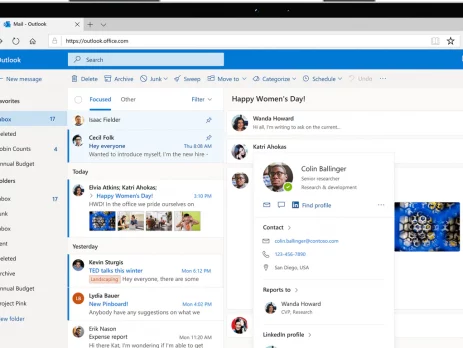
How can I get started using Outlook for the first time? (Microsoft 365)

Before using Outlook for the first time, you will need to add your Outlook profile. 1. Open the Outlook application 2. Enter your Microsoft 365 account details After that, click Connect and enter your email address. When asked, type your Microsoft 365 password or your logon password in the space provided. Your 365 password will normally consist of one uppercase character, three lowercase characters, and four numbers (for example, Dafu3648).If you have forgotten your 365 password, please contact Impact Computing. 3. Wait for Outlook to configure your profile This may take a few minutes to complete. Once Outlook has finished you will see the following screen. You can now click Finish. Outlook will then setup your mailbox and open. If you have access to any shared mailboxes, they will be automatically added to Outlook, but this could take up to 30 minutes. If you haven't received a shared mailbox by this time, please contact Impact Computing. Need a license?...

How do I create a bootable Windows USB drive?

You must first build the installation media before installing Windows from a USB drive. Once the USB flash drive is connected, your computer will be able to read this and boot from it. The methods for making a bootable USB flash drive using Microsoft's Media Creation Tool are outlined here. Download Windows 10 and Secure Affordable Software Keys If you're looking to buy Windows keys cheap or get access to Microsoft office keys cheap, you're in the right place. In this blog, we'll guide you through the process of downloading the appropriate Windows installation media and setting up a bootable USB drive. Plus, we'll show you how to find the cheapest software keys, making your software purchases both easy and affordable. Step-by-Step Guide to Downloading Windows To get started, you first need to download Windows 10 from the official Microsoft website. Here’s how to do it: Download the installation media from Microsoft’s official...