


AEC Collection vs Buying Separately: Which Wins in 2026?
The pitch writes itself. One subscription, fifteen or so applications, and a price that sits well under the sum of the parts. Put like that, buying the Architecture, Engineering and Construction Collection looks less like a decision and more like arithmetic. Most comparisons you will find stop right there, line up the list prices, and declare the bundle the winner.
That arithmetic only holds if you open more than one of those applications. Plenty of offices do not. A practice that models in Revit, exports a PDF set and never touches coordination or infrastructure design is paying for twelve tools it will not install. We sell both routes on this site, so we have no reason to push you either way, and the honest version of the answer is narrower than the marketing: the collection wins on app count and on admin, separate licences win on precision, and the switch happens somewhere around the second application you genuinely use every week.
Short answer
Buy the AEC Collection if you need two or more of its applications in a normal month, if your work crosses from buildings into site or infrastructure design, if you run clash coordination, or if the app you need is Civil 3D or InfraWorks, which we do not stock on their own. Buy separately if one application carries your whole week, if different people need different single tools, or if you want to add a second product later without renewing a bundle you have outgrown. A mixed team is allowed to mix.
AEC Collection vs separate licences: how they compare
What the collection actually contains
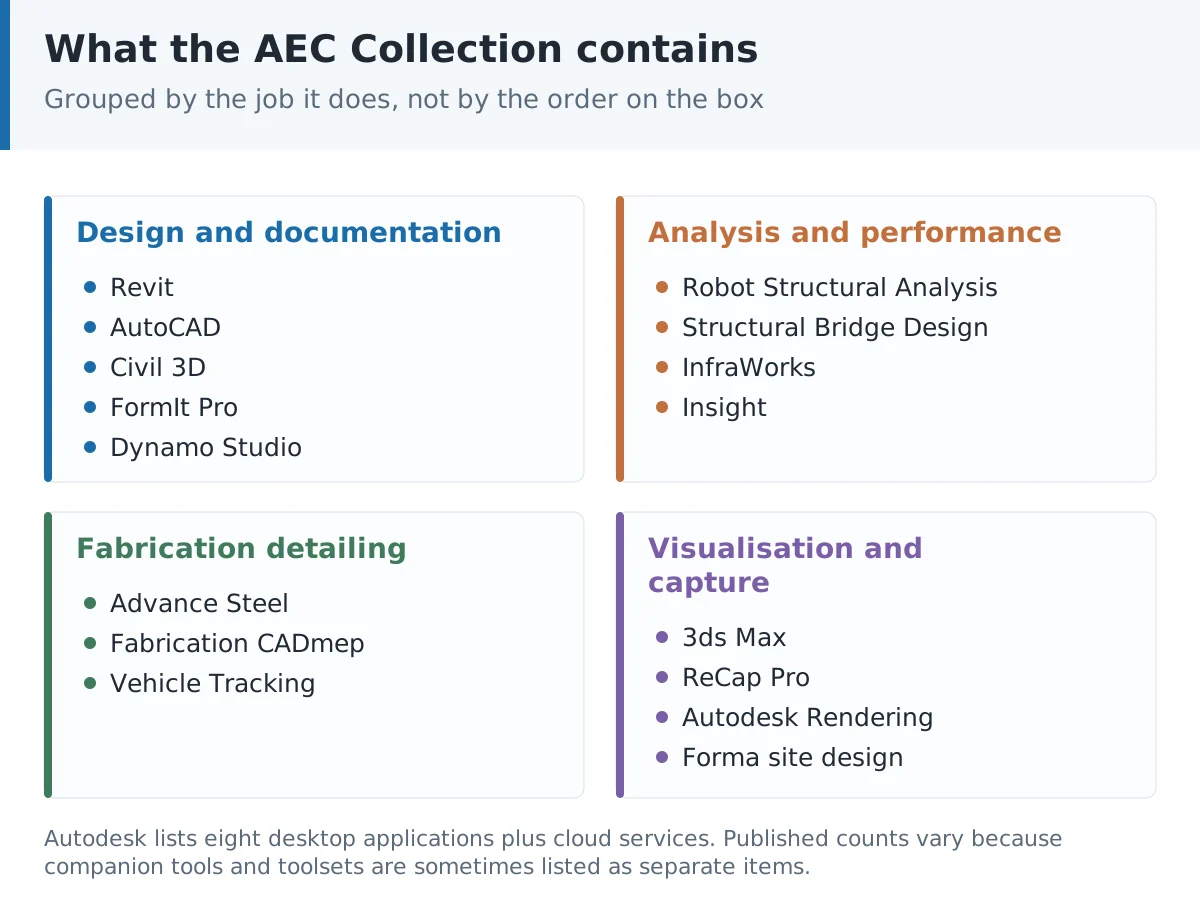
Autodesk’s own listing for the collection puts eight desktop applications alongside a set of cloud services. On the desktop side: Revit, AutoCAD, Civil 3D, Robot Structural Analysis Professional, Advance Steel, Fabrication CADmep, 3ds Max and ReCap Pro. On the cloud side: Forma for data management, site design and building design, plus InfraWorks, Insight and Autodesk Rendering. Resellers, including this one, often list a longer set because toolsets and companion apps such as Vehicle Tracking, FormIt Pro, Dynamo Studio or Structural Bridge Design get counted individually. Cloud model coordination sits outside that list: a BIM Collaborate Pro subscription is bought separately and is not automatically included in the collection. The per-product route is priced individually: the full list of Autodesk licenses available separately shows which titles are worth splitting out of the collection.
Read that list again and group it by job. Design and documentation sits with Revit, AutoCAD and Civil 3D. Analysis sits with Robot and Structural Bridge Design. Fabrication detailing sits with Advance Steel and CADmep. Visualisation and reality capture sit with 3ds Max, ReCap Pro and Rendering. Four jobs. Very few practices do all four in house, and the ones that do usually have specialists who each live in a single tool rather than one person hopping between eight.
The app count is not the question
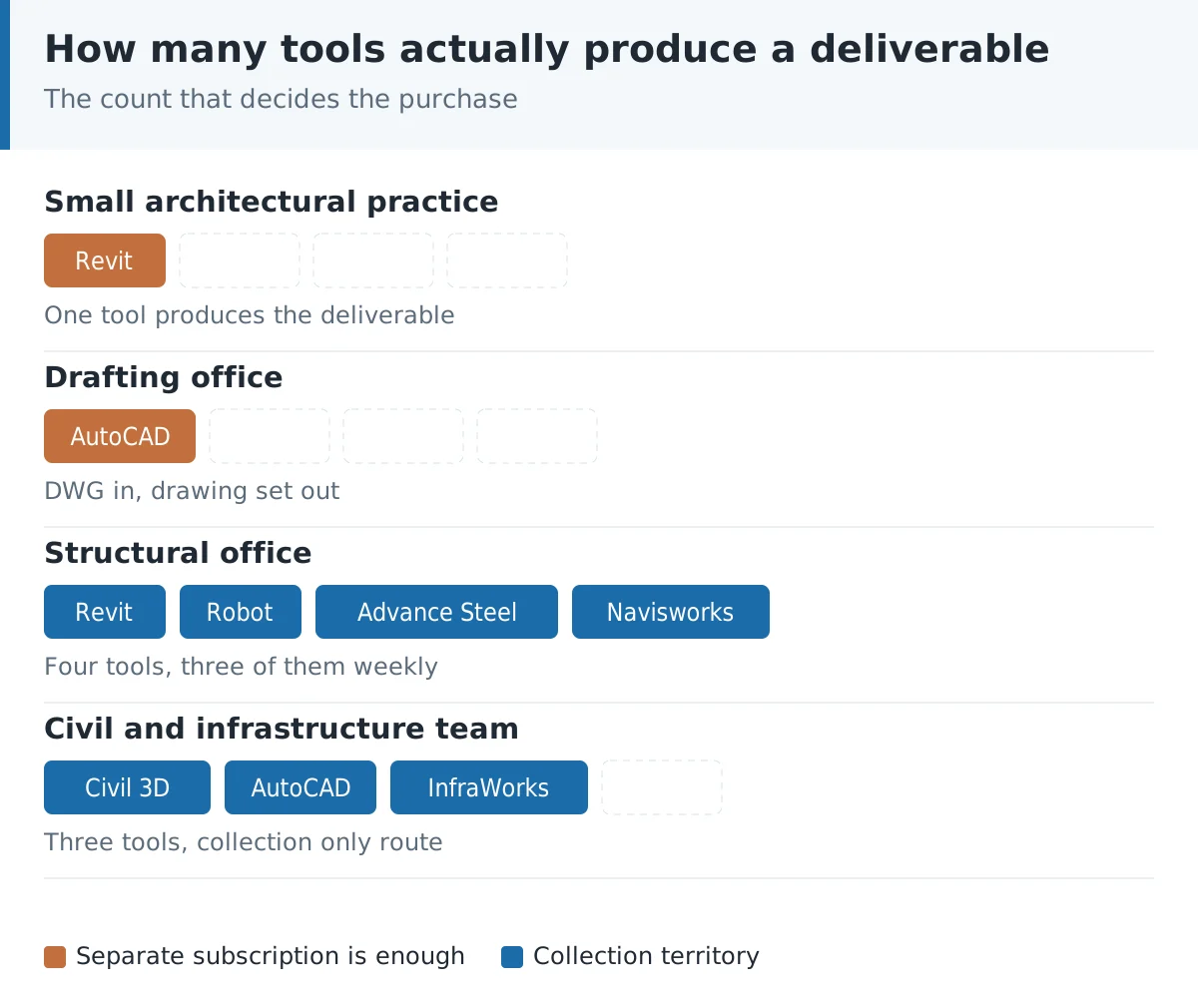
Here is the test we would run before spending anything. Look at the last three projects you delivered and write down, for each, which software actually produced a file that left the office. Not which software you opened once to look at a model. Which one produced a deliverable.
For a lot of small architectural practices that list has one name on it. Revit, every time, with the odd DWG round trip for a consultant. For a structural office it is often two: Revit for the model and Robot for the analysis. For a civil team it is Civil 3D plus AutoCAD, and sometimes InfraWorks for the early option studies. Once your list hits two names consistently, the bundle starts making sense on cost as well as on convenience. At one name, you are buying a cupboard of tools to use a single drawer.
There is a counter argument we take seriously. Tools you own get tried. A practice that has ReCap Pro sitting there will eventually bring a point cloud into Revit instead of measuring a refurbishment by hand, and that habit changes what work they can bid for. If you are deliberately trying to widen what the office can do, the collection is a reasonable way to buy the option to experiment. Just call it that, rather than calling it a saving.
Platform, and the Mac problem nobody mentions
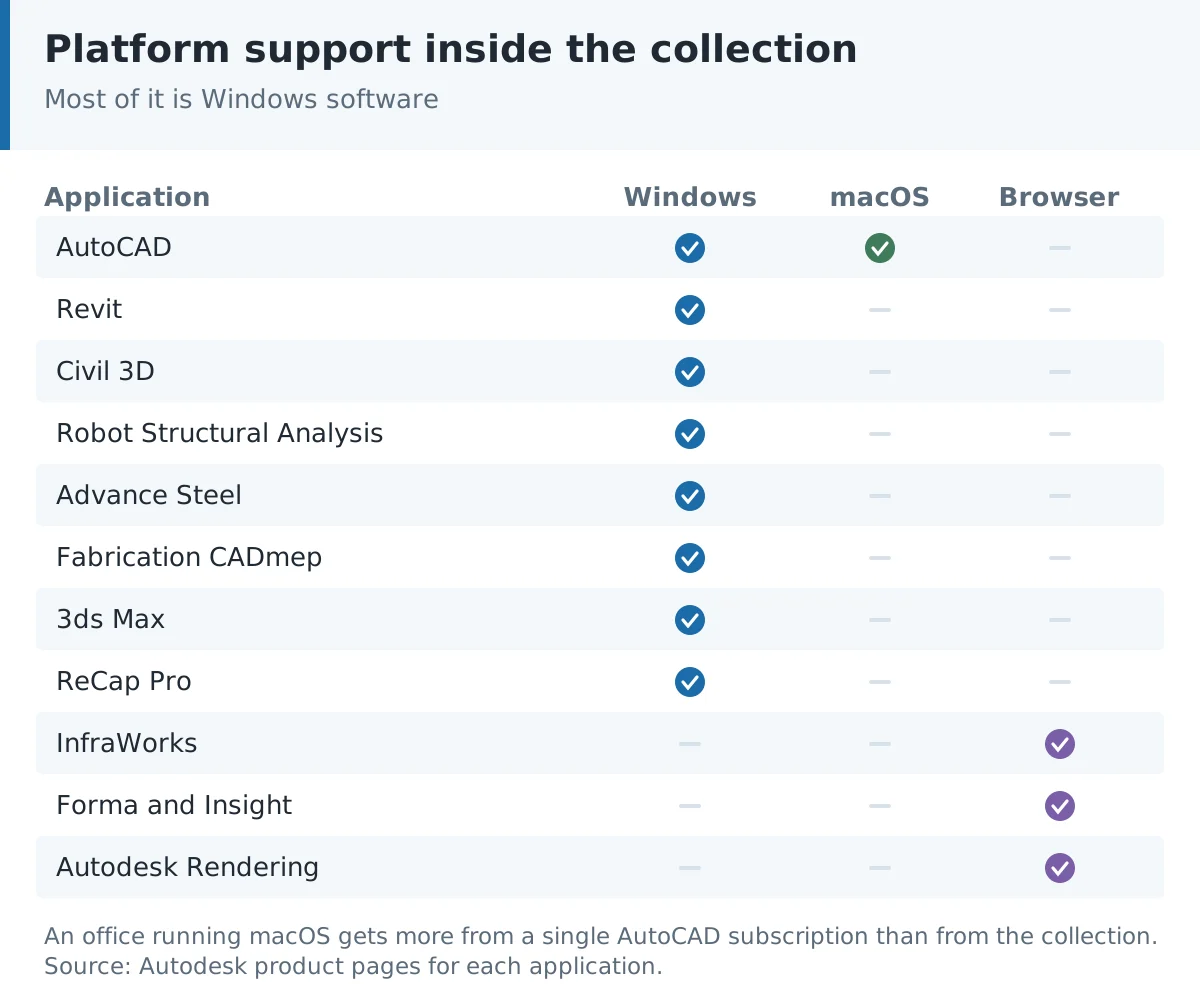
This one catches people out, and it catches them out after the money has moved. Most of the collection is Windows software. Autodesk states plainly that Civil 3D runs on Microsoft Windows. Revit, Robot, Advance Steel and CADmep are the same story. AutoCAD is the exception, with Windows, macOS and Linux builds, and the cloud pieces run in a browser.
So if the office is on Macs, buying the collection hands you a set of applications you cannot install without a virtual machine or Boot Camp on older hardware, and Apple Silicon makes the virtual machine route more awkward than it used to be. In that situation a single AutoCAD licence does more for you than a bundle. A Mac studio doing mostly architecture has another route: Archicad 27 runs natively on macOS and is bought once, outside the collection arithmetic. We flag this because our own product page for the collection is filed under a Windows and Mac slug, which is misleading given what is inside it, and we would rather tell you than have you find out at install time.
One renewal date instead of five
Admin is the argument that never makes it into comparison tables, and for an office of six to twenty people it is worth real money. Five separate subscriptions means five renewal dates, five invoices to code, five sets of version alignment to check before a project handover. One collection means one date.
Version alignment deserves its own sentence. If your Revit seat is on the 2026 release and the consultant’s Navisworks is a year behind, someone loses an afternoon to a file that will not open cleanly. Buying the applications together makes it much likelier they move up together, because you update the set rather than remembering which product you renewed in March.
Swapping tools when the work changes
Separate licences are rigid in a specific way. You picked Revit in January because the year looked like housing, then in June you win a road scheme and discover that Civil 3D is the tool for it. You now buy a second subscription, and the Revit one keeps running whether or not anyone opens it. The collection absorbs that swing without a new purchase, which is the strongest practical case for it. Firms with lumpy, varied workloads feel this more than firms doing the same building type all year.
There is a third route for genuinely occasional use. Autodesk Flex sells pre-purchased tokens that draw down at a daily rate per product, and the tokens stay valid for a year from the date of purchase. If you open Advance Steel four days a year, that is a better shape than either option on this page. It stops being sensible fast once usage becomes weekly, and it only covers products Autodesk has made eligible, so treat it as a top up rather than a plan.
What happens when the team grows
Both routes are seat based, so growth multiplies whatever you chose. The difference is what each new person costs. A new modeller joining a practice on separate Revit licences needs one Revit seat, nothing more. The same person joining a practice standardised on the collection needs a full collection seat, including the eleven applications they will never open.
Which is why the sensible answer for a growing office is usually mixed rather than uniform. Collections for the people who cross between tools, single applications for the people who do one job well. We will come back to that below, because it is the arrangement we see work most often and almost nobody plans for it up front.
Full comparison: collection against separate subscriptions
| Criterion | AEC Collection | Separate subscriptions |
|---|---|---|
| What you get | Eight desktop apps plus cloud services and companion tools | Exactly the applications you pick |
| Licence model | Term subscription, seat based | Term subscription, seat based |
| Cost shape | One line, flat whatever you use | Scales with the number of tools |
| Break even point | Usually around two applications in regular use | Better below that |
| Operating system | Mostly Windows, AutoCAD also macOS and Linux | Depends on the app you choose |
| Civil 3D access | Included | Not stocked separately on this site |
| Clash coordination | Navisworks Manage level coordination included | Buy Navisworks on its own |
| Structural analysis | Robot and Structural Bridge Design included | Buy Robot on its own |
| Reality capture | ReCap Pro included | Buy ReCap Pro on its own |
| Visualisation | 3ds Max and cloud rendering included | Buy 3ds Max on its own |
| Renewal admin | One date, one invoice | One per product |
| Version alignment | Applications move up as a set | Your job to keep in step |
| Adding a tool mid year | Already there, just install it | New purchase |
| Cost of a new starter | Full collection seat | Only the app they need |
| Best fit | Multidisciplinary teams, varied workloads | Single discipline offices, specialists |
Where AutoCAD All Apps fits
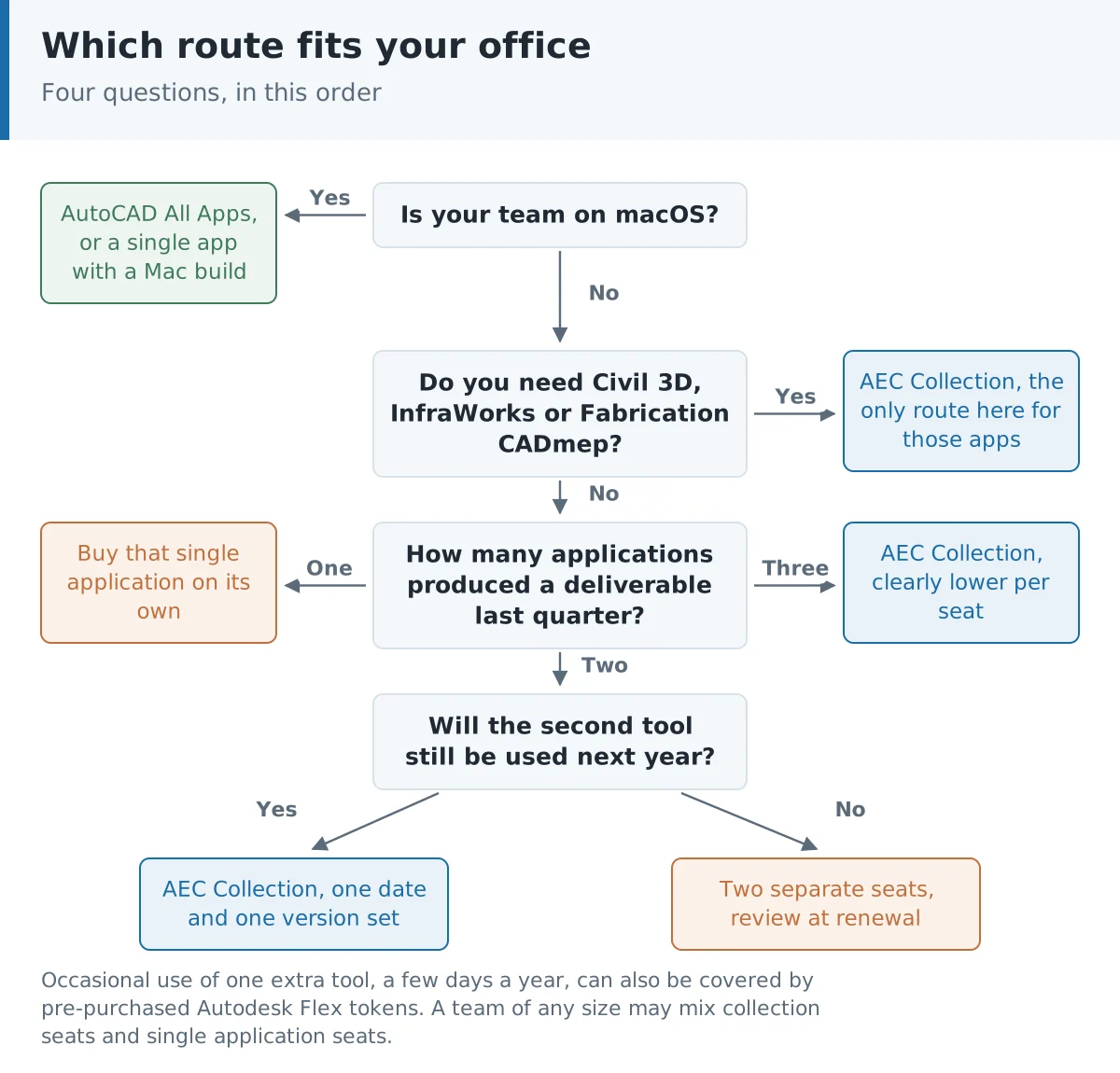
There is a third option that gets skipped in this comparison because it does not look like a competitor, and for a good number of buyers it is the right answer. Some offices do not have a BIM problem at all. They have a drawing problem: twenty years of DWG files, consultants who send flat 2D, a site team that reads prints. A collection built around Revit and Civil 3D is an expensive way to solve that.
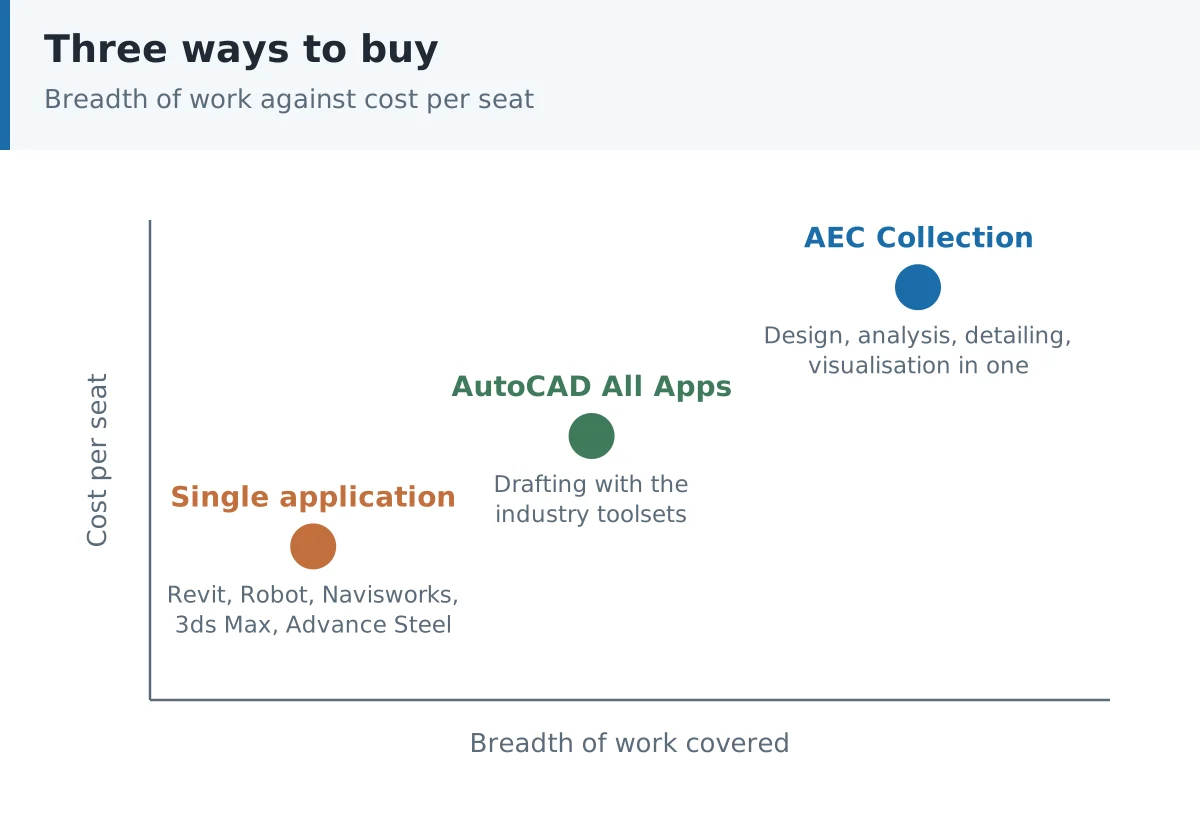
AutoCAD with its industry toolsets, sold here as AutoCAD All Apps, covers the specialised drafting work that used to need separate products: Architecture, Mechanical, Electrical, MEP, Plant 3D, Map 3D and Raster Design. It runs on Windows and macOS. It opens your archive without a translation step. If the deliverable leaving your office is still a drawing set rather than a model, start here and add a modelling seat later when a client asks for one.
| Question | AEC Collection | Single app | AutoCAD All Apps |
|---|---|---|---|
| Main output | Models, analysis, coordination | One discipline deliverable | 2D drawing sets |
| Runs on Mac | Partly | Depends | Yes |
| Legacy DWG work | Yes, via AutoCAD | Only if you picked AutoCAD | Native |
| Site and infrastructure | Civil 3D, InfraWorks | Not unless bought | Map 3D only |
| Clash detection | Included | Separate buy | No |
| Cost per seat | Highest | Lowest for one tool | Middle |
| Typical buyer | Multidiscipline practice | Specialist or solo | Drafting office |
What this costs, and what you are actually buying
We will not print Autodesk list prices here. They move by region and by promotion often enough that any figure in an article is wrong within months, and a stale number is worse than no number. What we can tell you is the shape of the commitment. Autodesk states that a 1-year or 3-year subscription saves 33 percent over paying monthly, so the monthly option is a convenience you pay for rather than a cheaper entry point. Both the collection and the individual products are term subscriptions, not a one off purchase of a version, and both are counted per user.
One habit worth keeping, whichever route you take: price the second year before you sign the first. Renewal is where software budgets quietly go wrong, because the decision gets made once and then repeats by default. Put a reminder in the calendar six weeks before the date and ask the same question again, with the last year’s actual usage in front of you. If two applications turned into one, you have a saving sitting there.
What we supply on this site, for the collection and for the single applications: a 1-year subscription, 1 user and up to 2 devices, digital delivery after payment, and activation instructions included with the order. Current pricing sits on each product page, since it moves. Instant Key is an independent software reseller.
Which one should you choose?
Choose the AEC Collection if…
- Two or more of its applications appear in a normal month’s work, not just in your plans for next year.
- Your projects cross from buildings into site, drainage, roads or bridges, where Civil 3D and InfraWorks earn their place.
- You run coordination yourself rather than sending models out to a consultant for clash checking.
- The application you need is Civil 3D, InfraWorks or Fabrication CADmep, none of which we stock on their own today.
- You are on Windows and you want one renewal date and one set of versions to keep in step.
Choose separate subscriptions if…
- One application carries almost all of your output, which is the common case in small architectural and structural practices.
- Different people need different single tools, so a uniform bundle would pay for overlap nobody uses.
- You want to add the second product when the work actually arrives, not in advance.
- Your office is on macOS, where most of the collection cannot be installed without a virtual machine.
- Budget approval is easier in small, separately justified lines than in one large one. This is not a technical reason, and it decides plenty of purchases anyway.
Choose AutoCAD All Apps if…
- Your deliverables are drawing sets and your archive is DWG.
- You want macOS support without compromise.
- You need discipline specific drafting, in MEP, electrical or mapping, rather than a full BIM model.
- You expect to add a modelling seat later and want to keep this year’s spend contained.
The two application test, worked through
Abstract advice is easy to agree with and hard to act on, so here are two real shapes of office and what we would actually buy.
A four person architectural practice doing housing and refurbishment. Everything is modelled in Revit. The survey arrives as a DWG on a Monday, gets linked, and nobody opens AutoCAD again that month. Structural work goes to an engineer down the road. Renders are ordered from a freelancer twice a year. That office needs Revit seats and nothing else, and a collection would be four cupboards for four drawers. If the refurbishment work grows and they start buying point clouds, revisit it then, because ReCap Pro and a collection seat for whoever does the survey work changes the sum.
Now a six person structural office. Models in Revit, analysis in Robot Structural Analysis, steel detailing in Advance Steel for about a third of jobs, and occasional coordination in Navisworks when the contractor asks for a federated model. Four applications, three of them weekly for at least two people. That is a collection office, and it is not close. The version alignment argument alone is worth it when a Revit model has to round trip into Robot and back. For the solver itself, see Robot Structural Analysis vs ETABS.
Notice what decided both cases. Not features. How many tools produce a deliverable, and how often.
Mixing both across one team
Nothing requires an office to standardise on one purchasing model, and the best arrangements we see rarely do. A practice of twelve might run two collection seats for the people who cross between modelling, analysis and coordination, and ten single Revit seats for the people whose job is to model. Spend lands where the breadth is actually needed.
Two cautions on that. First, keep the release year the same across the office, whatever licence each person holds, because a mixed estate is where the version problems start. Second, write down who holds what. Mixed licensing without a record is how offices end up renewing a collection for someone who left and short of a Revit seat for the person who replaced them. A spreadsheet with four columns is enough: person, product, start date, renewal date.
The products behind this comparison
The AEC Collection is the bundle route: a single 1-year subscription that covers the design, analysis, detailing and visualisation applications listed above, sold here for one user with up to two devices. It is the only way to reach Civil 3D and InfraWorks through our catalogue at the moment, which is worth knowing if those are the tools you came for.
On the single application side we stock Revit for BIM authoring, AutoCAD All Apps for drafting with the industry toolsets, Navisworks for coordination and clash work, Robot Structural Analysis Professional for analysis, Advance Steel for steel detailing and 3ds Max for visualisation. All are 1-year subscriptions with digital delivery and activation instructions included. If you want the wider picture on how these tools relate to each other, our Autodesk software guides hub collects the comparisons in one place.
Frequently asked questions
Is the AEC Collection cheaper than buying applications separately?
It is cheaper than buying every application it contains, which is not the comparison that matters. Against the one or two applications you actually use, a single subscription is usually less. The crossover sits around two applications in regular use, and from three onwards the collection is normally the lower cost per seat.
How many applications are in the AEC Collection?
Autodesk lists eight desktop applications and six cloud services. Counts you see elsewhere run higher because companion tools and toolsets such as Vehicle Tracking, FormIt Pro, Dynamo Studio and Structural Bridge Design are sometimes listed as separate items. The useful number is how many of them you will open.
Does the AEC Collection run on a Mac?
Only partly. AutoCAD has a macOS build and the cloud services run in a browser, but Revit, Civil 3D, Robot Structural Analysis, Advance Steel and Fabrication CADmep are Windows software. An office on Macs gets far more from a single AutoCAD subscription than from the collection.
Can I buy Civil 3D on its own from Instant Key?
Not at the moment. Autodesk does sell Civil 3D as a standalone subscription, but our catalogue currently reaches it only through the AEC Collection. If Civil 3D is the application you need, the collection is the route here.
Is the AEC Collection a one time purchase?
No. It is a term subscription, and so are the individual applications. What we sell on this site is a 1-year subscription for one user with up to two devices, delivered digitally with activation instructions. Access runs for the subscription term.
Does the collection include Navisworks clash detection?
Yes, coordination at the Navisworks Manage level is part of the collection. That matters because clash detection and interference checking sit in Manage rather than in Simulate, so if clash work is part of your service, check which edition any separate purchase gives you.
What is Autodesk Flex, and is it a third option?
Flex lets you pre-purchase tokens that are drawn down at a daily rate when someone opens an eligible product, and the tokens stay valid for a year from the date of purchase. It fits genuinely occasional use, a few days a year per tool. Once usage becomes weekly, a subscription is the better shape.
Can one team mix collection seats and single application seats?
Yes, and for offices above roughly eight people it is often the better arrangement. Give collection seats to the people who move between tools and single application seats to the specialists. Keep the release year consistent across everyone and keep a written record of who holds what.
Will I save by committing to three years instead of one?
Autodesk states that a 1-year or 3-year subscription saves 33 percent over the monthly price, so moving off monthly is where the saving sits. Beyond that, a longer term is a bet that your workload shape will not change, which is a fair bet for an established practice and a poor one for a young office still finding its market. The subscription sold on this site is a 1-year term.
What should I check before deciding?
Three things, in this order. Which applications produced a deliverable on your last three projects. Which operating system your team runs. What the second year costs, not just the first. If the answer to the first question is one application, buy that application.
Still weighing it up? Open the collection page and the single product page side by side, count the applications your last three projects actually needed, and buy for that number. Both routes are 1-year subscriptions with digital delivery and activation instructions included.
Related reading
- Revit vs AutoCAD: which one should you use
- Revit vs Archicad compared
- AutoCAD or AutoCAD LT: how to choose
- All Autodesk software guides
Products in this article


Digital delivery by email · Secure payment by card




Leave a Reply