






Microsoft Teams Enterprise
Price range: 1,500.00 $ through 3,500.00 $
- ✔1 year subscription
- ✔Works on Windows & macOS · Unlimited devices per user
- ✔All languages included
- ✔Sent by email after checkout
- ✔Free setup support
- Description
- Reviews (0)
- Installation Guide
- Why buy from instant-key.com ?
- Customer Questions
Description
Microsoft Teams Enterprise is a comprehensive communication and collaboration platform built for businesses with 300+ users. Part of the Microsoft 365 ecosystem, it provides advanced meeting capabilities for up to 1,000 participants, enterprise-grade security features, and deep integration with Microsoft Office applications. The platform supports large-scale webinars, global workforce management, and extensive third-party app connectivity through 700+ available integrations.
Key features
System requirements
| OS | Windows 10 version 1903 or later, macOS 10.14 or later |
| Processor | 1.6 GHz dual-core processor |
| RAM | 4 GB RAM |
| Storage | 4 GB available disk space |
| Graphics | DirectX 9 or later with WDDM 2.0 |
How to activate Microsoft Teams Enterprise
- 1Receive your product key after purchase — by email, on your account page, and on the order confirmation screen.
- 2Go to the official Microsoft setup page (office.com/setup for Office products, or microsoft.com/setup for Windows).
- 3Sign in with your Microsoft account, or create a free one if you don’t have one.
- 4Enter your 25-character product key when prompted.
- 5Download and install — your license is automatically linked to your Microsoft account.
Frequently asked questions — Microsoft Teams Enterprise
How will I receive my license?
Is this an authentic license?
Is payment secure?
Can I get an invoice?
Do I need Microsoft 365 to use Teams Enterprise?
Can Teams Enterprise integrate with non-Microsoft platforms like Zoom or Slack?
How to Activate Microsoft Teams Enterprise(35 Users with Teams – 1 Year License)
1. Activate Microsoft Teams Enterprise License
Go to the official Microsoft product key activation page:
https://signup.microsoft.com/productkeystart
- Sign in with your Microsoft Admin Account.
- If you don’t have one, click Create Account to set up a new admin profile.
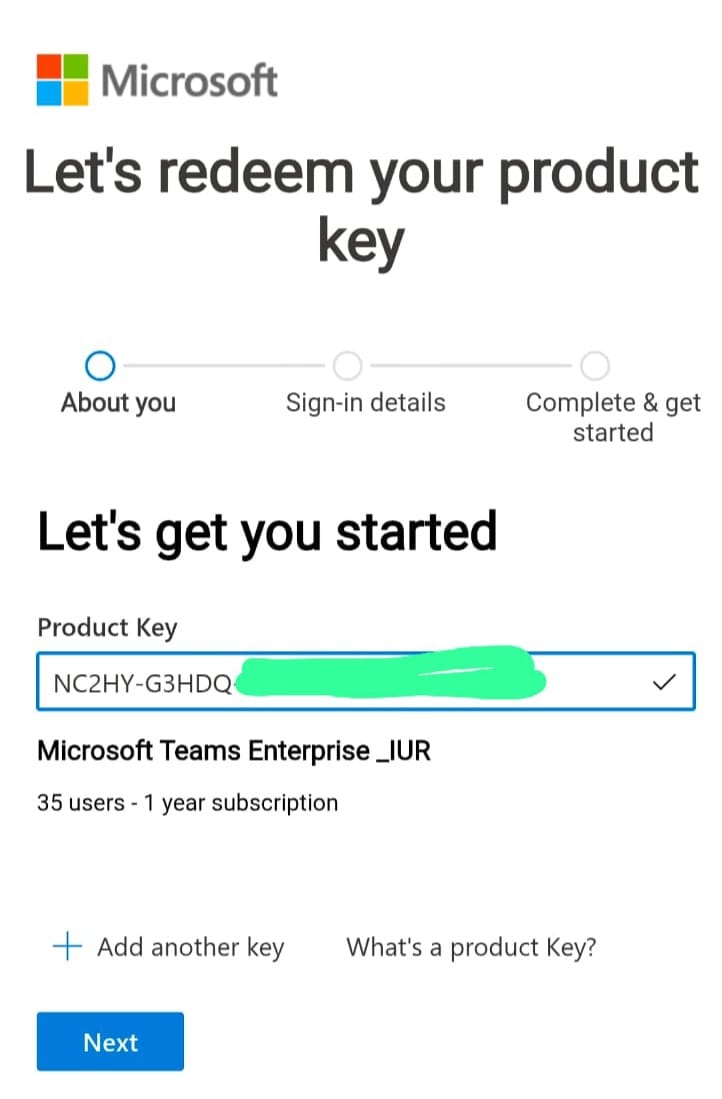
- Enter your Microsoft Teams Enterprise (1-Year) Product Key and click Next.

- Follow the on-screen steps to complete the license activation.
After successful activation, open the Microsoft Admin Center:
https://admin.microsoft.com
- Go to Users → Active users
- Select users and click Manage product licenses
- Assign Microsoft Teams Enterprise licenses to up to 35 users
2. Access Microsoft Teams for Users
After licenses are assigned:
- Users should sign in at:
https://teams.microsoft.com
or
https://office.com - Log in using the assigned work email and password
- Microsoft Teams will activate automatically
Users can start chatting, meetings, and collaboration
Need Help?
If you face any issues during activation or installation, simply reply to your order email.
Our support team is available 24/7 and can assist you remotely via AnyDesk.
Why Buy From Instant-Key?
Choosing Instant-Key.com means choosing a trusted global platform for fast, secure, and affordable digital software licenses. Every purchase is backed by genuine products and reliable customer support.100% Genuine Software Keys
All license keys are authentic, verified, and sourced from trusted suppliers. No cracks, no illegal activations — only legitimate, secure software.Instant Delivery
After successful payment, your license key and download link are delivered instantly to your email and user dashboard so you can start installing right away.Multiple Payment Methods
We support a wide range of payment options including Skrill, Mollie, MasterCard, Visa, Apple Pay, Google Pay, Stripe and other major cards and wallets for a smooth and secure checkout.Reliable Customer Support
Our team is available through WhatsApp, Email, and Live Chat to assist with installation, activation, or any questions you may have.Affordable Pricing
Get premium software like Microsoft Office, Windows OS, Adobe, Autodesk, CorelDRAW, antivirus tools, servers and more at competitive prices to help you save on essential digital tools.Easy Installation Guides
Every order includes a clear step-by-step PDF installation guide so even first-time users can install and activate their software with ease.Warranty and Replacement Guarantee
All keys come with an activation warranty. In case of any activation issue, we provide a quick replacement, ensuring a smooth and worry-free experience.Trusted by Customers Worldwide
Individuals, businesses, students, and professionals around the world rely on Instant-Key.com for genuine digital licenses that support productivity, creativity, and business growth.General Inquiries
There are no inquiries yet.






Reviews
There are no reviews yet