

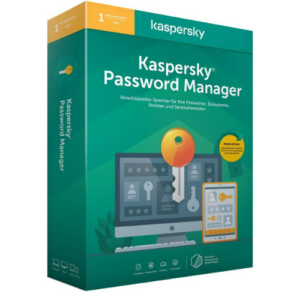
Kaspersky Password Manager
29.00 $
- ✔1 year subscription · Renewable
- ✔Works on Windows, macOS, Android & iOS · 1 device
- ✔Password manager included
- ✔Sent by email after checkout
- ✔Free setup support
Delivered in minutes by email
- Description
- Reviews (0)
- Why buy from instant-key.com ?
Description
Kaspersky Password Manager offers a reliable and secure solution to store and manage passwords, personal information, and sensitive documents. Developed by Kaspersky, a global leader in cybersecurity, this powerful password management tool provides strong encryption, auto-fill capabilities, and cross-platform synchronization. Install on the device of your choice — Windows, macOS, Android & iOS. License covers 1 device at a time. Protects against password breaches while ensuring your credentials remain safely accessible whenever needed.
Key Features
Strong Password Generation
Creates and saves complex, unique passwords for each account to prevent password reuse vulnerabilities
Industry-Leading Encryption
Uses advanced encryption technology to protect your stored credentials and sensitive documents
Auto-Fill Functionality
Automatically fills login credentials across supported browsers for quick and convenient access
Cross-Platform Synchronization
Syncs your password vault across Windows, macOS, Android, and iOS devices
Biometric Authentication
Supports fingerprint and face recognition for quick and secure vault access
Secure Document Storage
Safely stores credit card details, important notes, and sensitive documents in encrypted format
System Requirements
| Operating System | Windows, macOS, Android & iOS |
| Processor | Compatible with current minimums for each supported platform |
| RAM | See vendor requirements |
| Storage | See vendor requirements |
How to Activate Kaspersky Password Manager
- Complete your purchase — your license key is sent by email and displayed on the confirmation screen.
- Download the latest installer from the vendor’s official website.
- Run the installer and follow the on-screen setup wizard.
- Enter your license key when prompted to activate the software.
- Allow the initial scan to complete — your device is now fully protected.
Frequently Asked Questions
How will I receive my license?
Is this a valid license?
Is payment secure?
Can I get an invoice?
What happens if I forget my master password for Kaspersky Password Manager?
Can Kaspersky Password Manager import passwords from other password managers or browsers?
Need help? Our support team is available 7 days a week. Contact us via live chat or email for activation assistance, compatibility questions, or any other inquiry.
Add a review
You must be logged in to post a review
Log In










Reviews
There are no reviews yet