


Fusion 360 vs Inventor: Which One Should You Use in 2026?
Search for a comparison of these two and you land on a ranking: Fusion for hobbyists, Inventor for real engineers. That framing has been wrong for years, and it sells people the wrong subscription. Autodesk keeps both products alive because they answer different questions. Autodesk Fusion folds design, machining, simulation and circuit boards into one cloud-connected workspace. Inventor is a Windows desktop application built around parametric assemblies, manufacturing drawings, and the data control a team needs when six people touch the same gearbox.
So the useful question is not which one is more capable. It is which one matches the way your files move, who signs off on your drawings, and what machine sits on your desk. A one person shop cutting aluminium brackets on a router has almost nothing in common with a machine builder shipping welded frames and a 200 page drawing pack. Both get served well here. Just not by the same tool.
Short answer
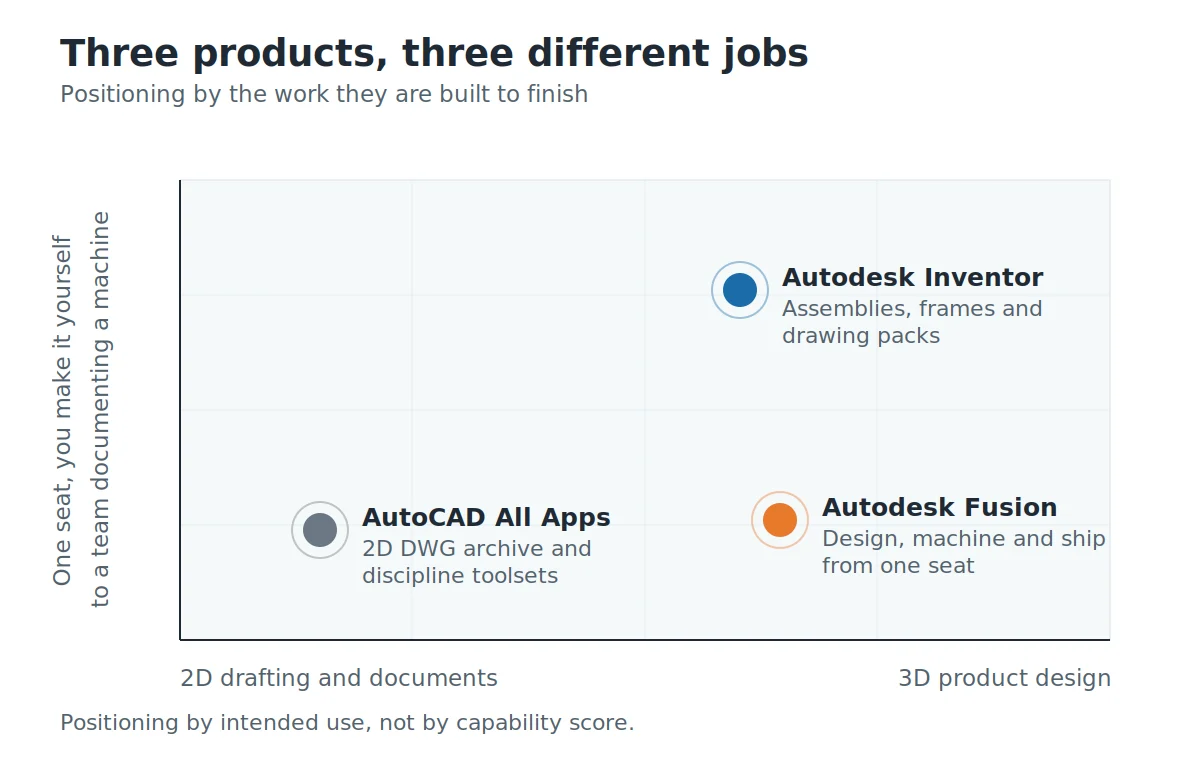
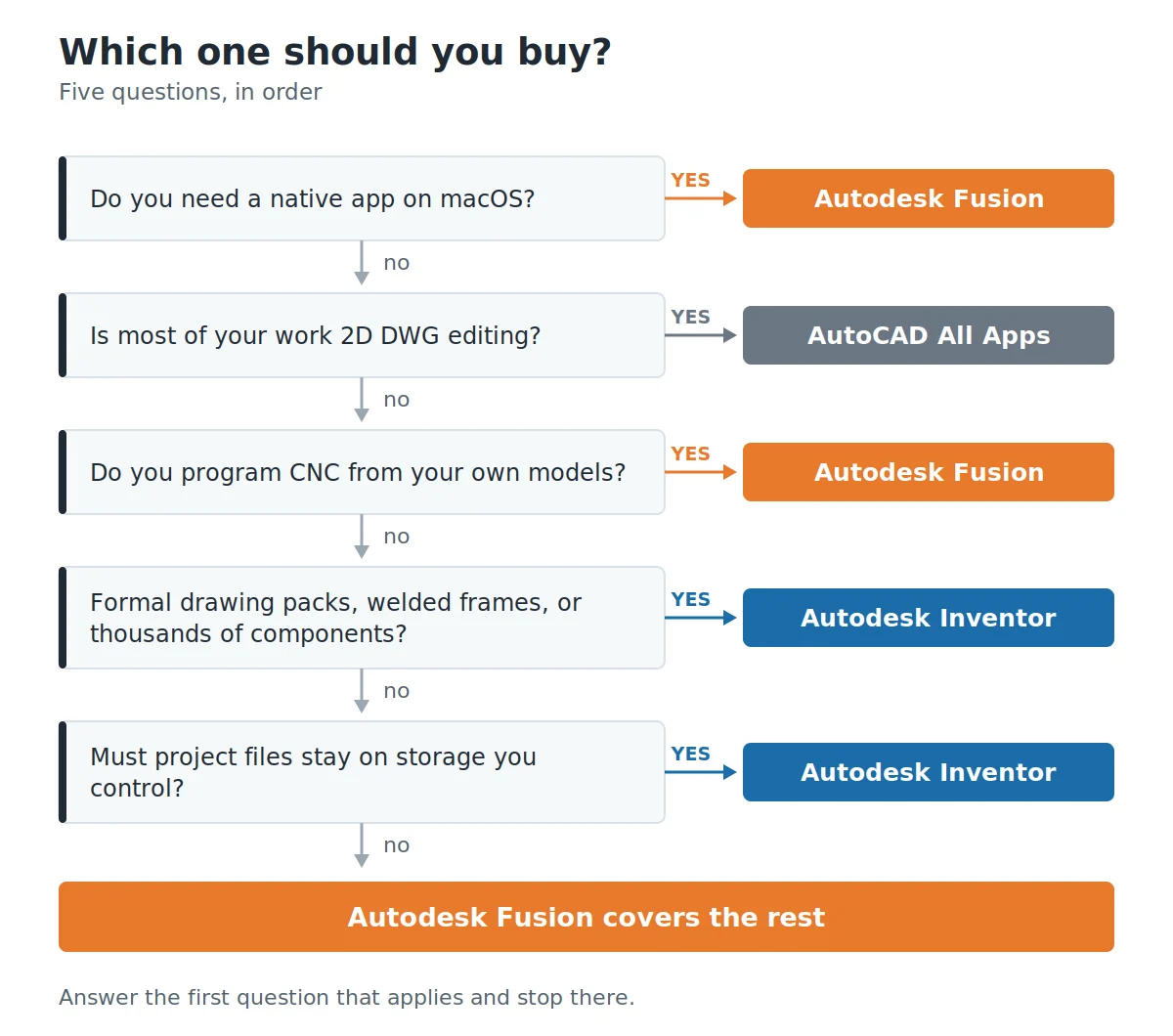
Choose Autodesk Fusion if you design and manufacture from the same seat, work on a Mac, or want toolpaths and simulation living in the same file as the model. Choose Inventor if you ship formal 2D drawings, build large assemblies, run welded frames or sheet metal regularly, or need project data on storage you control. Shops that do both often keep Fusion for machining and Inventor for documentation, and that is a sound answer rather than indecision.
Fusion vs Inventor: how they compare
Where your files actually live
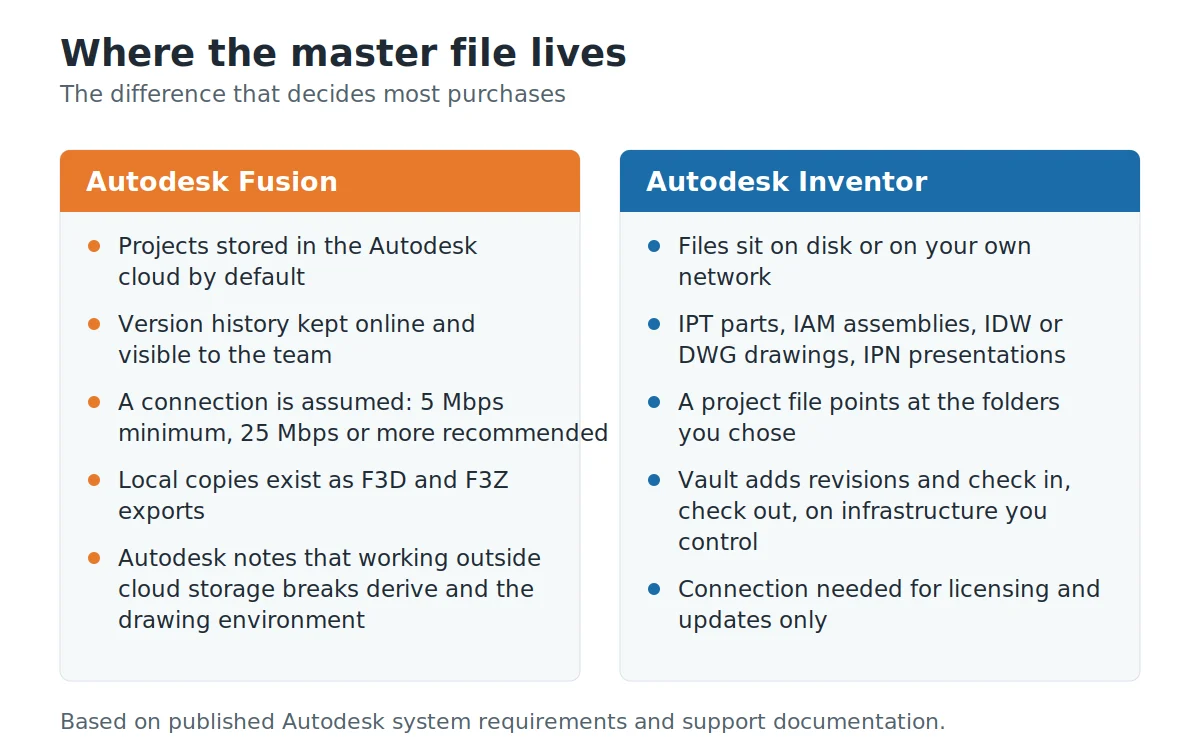
This is the difference that decides most purchases, and almost every comparison buries it under modeling features. Fusion keeps projects in Autodesk’s cloud. That is not a preference you switch off to work the old way. Autodesk’s own support note on the subject recommends saving Fusion files in the cloud, and warns that otherwise some features such as derive will not work and the drawing environment will be unusable. Fusion therefore assumes a connection: Autodesk asks for at least 5 Mbps down and recommends 25 Mbps or better.
Inventor works the other way round. Parts are .ipt files, assemblies are .iam, drawings are .idw or DWG, presentations are .ipn, and a project file points at folders you chose. When shared folders stop coping, Vault sits underneath to handle revisions, check in and check out, on infrastructure your IT team runs. Ask an engineering manager in aerospace or medical devices where the master file lives. You will get an answer in about four seconds, and it will not include the word cloud.
Neither model is better in the abstract. Fusion’s approach means a colleague sees your change without anyone zipping a folder. Inventor’s approach means a power cut, an expired card or a slow hotel connection does not stop work.
Modeling, and what the history tree remembers
Both are parametric modelers, and for a bracket with fifteen features you would struggle to tell the difference in the finished geometry. Inventor drives design intent through sketch constraints, dimensions and formulas on parameters, which is exactly how Autodesk describes it. The 2026 release added a feature suppression parameter and let you sort parameters into custom groups, which sounds minor until you are handed a part with ninety of them.
Fusion mixes parametric history with direct editing, freeform sculpting and mesh work in the same environment, and its timeline sits along the bottom of the screen rather than in a browser tree. That timeline is easy to read on a part with forty features. It gets harder to manage on a part with four hundred, and Fusion users learn to break designs into components earlier than Inventor users do. Inventor’s browser handles depth better, partly because it has had two decades of engineers complaining about it.
Assemblies, and how big they get
Inventor is built for assemblies that keep growing. You get interference checking as relationships are built, model states for configurations and simplification, Content Center libraries for standard hardware, and Frame Generator for welded structures. Frame Generator deserves its own sentence: you sketch a skeleton, pick members from Content Center, apply miters and notches, and Inventor computes member lengths and produces cut lists, parts lists and ballooned drawings from the result. If you build conveyors, guarding or machine bases, that single feature can justify the licence.
Fusion handles assemblies well up to a point. Components in one design, distributed designs and external references cover most product work. Past a few thousand components with a full drawing set hanging off them, Inventor is the safer bet, and anyone who has tried the alternative will nod at that.
Drawings, and the paperwork that leaves the building
Here the gap is real, and it is the reason plenty of shops run Fusion for months and then buy Inventor anyway. Inventor’s drawing environment is deep: parts lists, balloons, cut lists fed from Frame Generator, and in the 2026 release sketch based break views plus Linear Sum and Angular Sum dimensions for equally spaced features. None of that is glamorous. All of it matters when a customer dictates the title block and rejects sheets that do not match.
Fusion produces drawings. For a five sheet package going to a job shop you know, it is fine. For a forty sheet pack with revision history, weld symbols and a supplier who reads GD and T carefully, Inventor is less of a fight. We would rather say that plainly than pretend the two are level.
Manufacturing, simulation and circuit boards
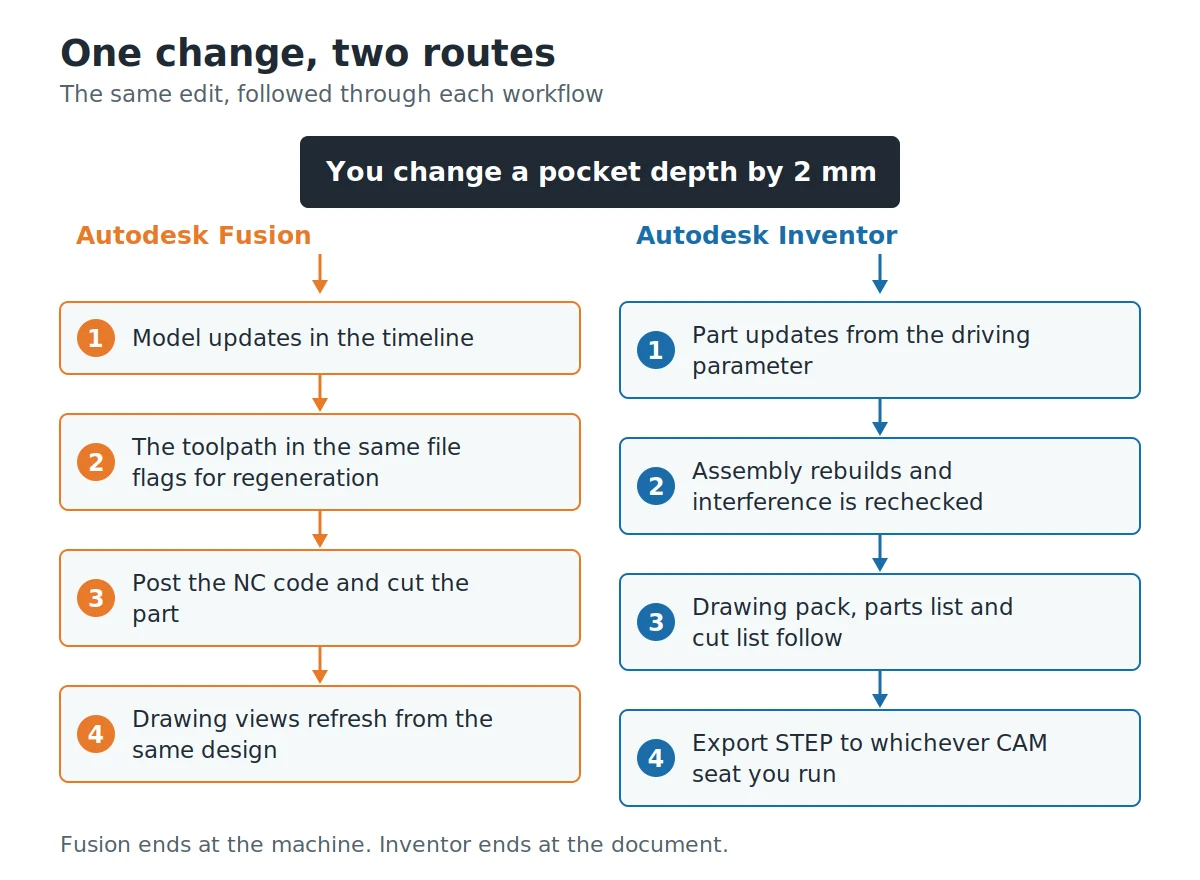
Fusion wins this one without much argument. Autodesk positions it as CAD, CAM, CAE and PCB design in one platform, with machining programmed against the model you just edited, advanced 3 to 5 axis strategies coming with the Manufacturing extension, and electronics work inherited from the EAGLE line. Capability tiers arrive as extensions, so a shop can add the Manufacturing or Simulation extension without changing tools, and generative design sits in the Simulation extension. Edit a pocket depth and the toolpath is right there asking to be regenerated. That short loop is the whole point of Fusion.
Inventor is not empty here. It ships dynamic simulation and stress analysis, and frames can be studied with beam elements, which helps when you are sizing a weldment rather than admiring a colour plot. But the machining story sits outside the modeling environment, and the board design story is not Inventor’s at all. If your week ends at a CNC control, Fusion is built for your week.
Platform, hardware and connection
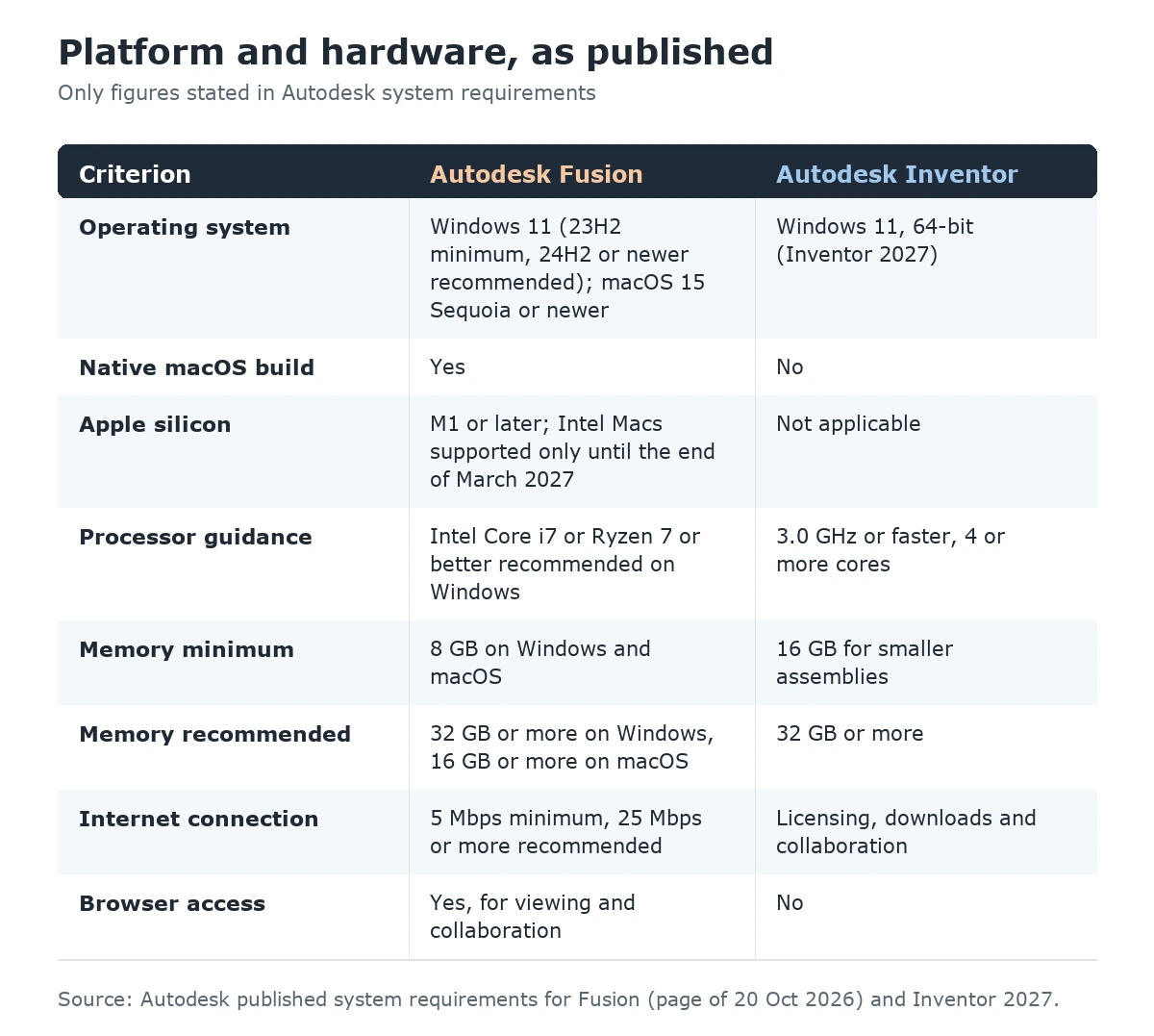
Autodesk lists Inventor 2027 for 64-bit Windows 11 only, with 3.0 GHz or faster and four or more cores recommended, and 16 GB of memory as the minimum for smaller assemblies (32 GB recommended). There is no macOS build. Mac owners who need Inventor end up on a Windows virtual machine or a remote Windows workstation, which works but adds a licensing and support conversation nobody enjoys.
Fusion runs natively on both. Autodesk lists Windows 11 (23H2 as the minimum, 24H2 or newer recommended) and macOS 15 Sequoia as the minimum, with macOS 26 Tahoe or macOS 27 recommended. Apple silicon is supported from the M1, and Intel Macs remain supported only until the end of March 2027, after which Fusion will require Apple silicon; Autodesk recommends an M-series Pro, Max or Ultra chip for larger designs. Memory guidance is modest at the low end, 8 GB on both macOS and Windows, and generous at the top, 16 GB or more on macOS and 32 GB or more on Windows. Browser access covers viewing and collaboration. For a designer on a MacBook, this section ends the comparison on its own.
Fusion vs Inventor: full comparison table
| Criterion | Autodesk Fusion | Autodesk Inventor |
|---|---|---|
| Primary purpose | Design and manufacture in one platform | Mechanical design, assemblies and documentation |
| Operating system | Windows and macOS, plus browser access | Windows 11 only (Inventor 2027) |
| Apple Silicon | Supported from M1; Intel Macs supported only until the end of March 2027 | Not applicable, no macOS build |
| Where data lives | Autodesk cloud projects by default | Files on disk or on your network, Vault optional |
| Internet needed | Yes, 5 Mbps minimum and 25 Mbps recommended | For licensing, downloads and collaboration features |
| Native file types | Cloud designs, exported as F3D and F3Z | IPT parts, IAM assemblies, IDW and DWG drawings, IPN |
| Modeling style | Timeline history, direct edit, freeform, mesh | Sketch constraints, dimensions, parameter formulas |
| Large assemblies | Good to a few thousand components | Stronger, with model states and simplification |
| Welded frames | Modeled manually | Frame Generator with cut lists and ballooning |
| Sheet metal | Yes, flat patterns included | Yes, with industry standard bend allowances |
| 2D drawings | Capable | Deeper, built for large drawing packs |
| CAM and toolpaths | Built in; advanced 3 to 5 axis with the Manufacturing Extension | Handled outside the modeling environment |
| Simulation | Cloud simulation, extensions for more | Dynamic simulation, stress analysis, beam elements |
| Electronics and PCB | Included in the platform | Not part of Inventor |
| Design automation | Generative design, in the Simulation Extension | iLogic rules for configurable products |
| Best fit | Solo makers, machine shops, product teams | Machine builders, OEM suppliers, engineering offices |
Where AutoCAD All Apps fits
Plenty of mechanical shops do not actually have a Fusion or Inventor problem. They have a legacy DWG problem. Twenty years of fabrication drawings, supplier files that arrive as flat 2D, and a workshop that reads paper prints happily. If that is the shape of your week, a 3D modeler is the wrong first purchase. AutoCAD with its toolsets, sold here as AutoCAD All Apps, covers AutoCAD plus seven specialized toolsets (Architecture, Electrical, Map 3D, Mechanical, MEP, Plant 3D and Raster Design, which run on Windows only), and it opens the DWG files you already have without translation.
The combination we see work most often is simple. Keep AutoCAD for the 2D archive and quick supplier markups, and add one 3D seat where the new product design happens. If Shapr3D is on your shortlist as well, our three-way comparison of Shapr3D, Fusion 360 and AutoCAD covers how it differs.
| Question | Fusion | Inventor | AutoCAD All Apps |
|---|---|---|---|
| Main output | 3D models and toolpaths | 3D assemblies and drawing packs | 2D DWG drawings |
| Runs on Mac | Yes | No | AutoCAD yes, the specialized toolsets are Windows only |
| Legacy DWG work | Import only | Import, DWG drawings | Native |
| CNC programming | Built in | Outside the app | No |
| Large assemblies | Moderate | Strong | Not its job |
| Time to first useful day | Short | Longer | Short if you know AutoCAD |
| Typical buyer | Maker or machine shop | Machine builder | Drafting office |
What each one costs, and what you are actually buying
Autodesk changes its list prices and its regional promotions often enough that any number printed in an article ages badly, so we will not quote one. What matters more is the shape of the commitment. Both products are sold as term subscriptions rather than a one off purchase of a version, and both are seat based, so the sizing question is how many people model at the same time rather than how many computers exist in the building.
One habit worth keeping: price the second year before you sign the first. Renewal, not acquisition, is where CAD budgets quietly go wrong. If your 3D work is seasonal, say two intense months around a launch, that changes the calculation more than any feature on the table above.
What we supply on this site, for both products: a 1-year subscription, 1 user and up to 2 devices, digital delivery after payment, and activation instructions included with the order. Current pricing sits on each product page, since it moves. Instant Key is an independent software reseller.
Which one should you choose?
Choose Autodesk Fusion if…
- You design a part and then cut it, on a router, mill or printer, without handing the job to someone else.
- You work on a Mac and do not want a virtual machine in your life.
- Your team is small and spread out, and emailing folders has already caused one bad afternoon.
- You need electronics and mechanical design in the same project.
- You want simulation and generative studies inside the same platform, added as extensions.
Choose Inventor if…
- Formal 2D drawings are a deliverable, not an afterthought, and a customer specifies how they look.
- You build welded frames, guarding or structural weldments, where Frame Generator and cut lists pay for themselves quickly.
- Your assemblies run into the thousands of components.
- Your files must stay on storage your organisation controls, with Vault handling revisions.
- You configure variants of the same machine repeatedly and want iLogic rules doing the work.
Choose AutoCAD All Apps if…
- Your real workload is 2D, and the 3D talk is coming from outside the workshop.
- You maintain a large DWG archive that has to stay editable.
- You need discipline toolsets such as AutoCAD Mechanical or Electrical more than you need a solid modeler.
Running both without making a mess
A surprising number of shops end up with both, and it works as long as one rule holds: one product owns the master geometry. Pick it deliberately. The failure mode is a part modeled twice, once in each, and a Tuesday spent working out which version the machinist actually used. For a wider look at Inventor on its own, see our guide to whether Autodesk Inventor is the right CAD tool.
The split that causes the least pain puts Inventor upstream. Design, assemble and document there, then export STEP into Fusion for programming, keeping Fusion’s copy strictly downstream and disposable. Regenerate it after every design change rather than editing it. The reverse split, concept in Fusion and documentation in Inventor, also works for product design teams, but it needs discipline about when the concept freezes, because once Inventor drawings exist nobody wants to hear that the model moved.
Moving a project from Fusion to Inventor
Say the survey of the job arrives as DWG on a Monday, the concept gets built in Fusion that week because it is quick, and by Thursday the customer wants a drawing pack. This happens constantly, and the migration is less painful than people fear, provided you accept one thing up front: parametric history does not survive the trip.
Export the assembly as STEP, open it in Inventor, and you get accurate solids with a clean structure and no features. For a design that is finished, that is perfectly adequate, and Inventor’s direct editing tools handle the small changes that come back from review. For a design still moving, remodel the driving parts properly in Inventor instead. It feels wasteful for about an hour, then it saves a week. Sheet metal is the one area where guessing hurts: rebuild those parts natively so bend allowances and flat patterns are Inventor’s own rather than an imported approximation of them.
The products behind this comparison
Autodesk Fusion 360 is the cloud connected platform, still widely searched under its old name after Autodesk dropped the 360 in 2024. It covers CAD, CAM, CAE and PCB design, runs on Windows and macOS, and is sold here as a 1-year subscription for 1 user and up to 2 devices with digital delivery.
Autodesk Inventor is the Windows mechanical design application, aimed at parametric assemblies, sheet metal, frames and manufacturing documentation, also supplied as a 1-year subscription for 1 user and up to 2 devices. For teams whose workload is still mostly 2D, AutoCAD All Apps remains the honest answer, and on our current prices the less expensive one.
More on the rest of the range, including which toolsets come with which product, sits in our Autodesk software guides.
Frequently asked questions
Is Fusion 360 just a simplified version of Inventor?
No. They share a vendor and some geometry heritage, but they were built for different workflows. Fusion combines design, machining, simulation and PCB work in one cloud connected platform. Inventor is a desktop application focused on parametric assemblies, sheet metal, frames and manufacturing drawings. Fusion does several things Inventor does not, including integrated CAM and electronics design.
Does Inventor run on a Mac?
Autodesk lists Inventor 2027 for 64-bit Windows 11 only, so there is no macOS version. Mac users run it inside a Windows virtual machine or connect to a remote Windows workstation. Fusion, by contrast, has a native macOS build and supports Apple silicon from the M1 onward.
Can I use Fusion without an internet connection?
Only in a limited way. Autodesk’s support documentation recommends storing Fusion files in the cloud and warns that otherwise some features such as derive will not work and the drawing environment will be unusable. Autodesk asks for a minimum of 5 Mbps down and recommends 25 Mbps or more, so treat Fusion as a connected tool with short offline stretches rather than an offline tool.
Which one is better for 2D manufacturing drawings?
Inventor, clearly. Its drawing environment carries parts lists, balloons, cut lists generated from Frame Generator, and detailing tools that keep expanding, with sketch based break views plus Linear Sum and Angular Sum dimensions added in the 2026 release. Fusion produces usable drawings, but for a large drawing pack with a customer specified title block, Inventor takes less fighting.
Which is easier to learn?
Fusion, for most people, mainly because everything sits in one environment and the timeline shows the consequences of each step. Inventor rewards a proper grounding in parts, assemblies and drawings as separate documents, which takes longer to click. If you already know AutoCAD, neither is a shock, though Inventor’s file discipline will feel more familiar.
Can Inventor open Fusion files, and the other way round?
Both read neutral formats such as STEP and IGES, which is how most teams move work between them. Inventor also imports a wide range of non native CAD data and exchanges data with Revit for building projects. Expect solid geometry to transfer faithfully and parametric history not to, so decide which product owns the editable master before you start.
Do I need Inventor if I already have Fusion and a CNC machine?
Often not. If you design what you cut and the drawings are for your own workshop, Fusion covers the whole loop. The point where Inventor starts earning its place is when someone outside the building needs your documentation, when assemblies grow into the thousands of components, or when welded frames become routine.
What hardware do I need for each?
Autodesk recommends 3.0 GHz or faster with four or more cores for Inventor 2027 on Windows, with 16 GB of memory as the minimum for smaller assemblies and 32 GB recommended. For Fusion, the published minimums are modest, 8 GB of memory on both macOS and Windows, while the recommendations rise to 16 GB or more on macOS and 32 GB or more on Windows, with a dedicated GPU of 8 GB or better. Memory and GPU matter more than clock speed once assemblies get large.
Is Fusion 360 the same product as Autodesk Fusion?
Yes. Autodesk dropped the 360 from the name in January 2024, so Fusion 360 and Autodesk Fusion refer to the same product. Most searches, product listings and tutorials still use the older name, which is why you will see both spellings across the web and on this site.
Which one should a student or a new engineer learn first?
Learn Fusion first if you want to see a part go from sketch to finished component quickly, including how it gets made. Learn Inventor first if you are heading into machine building or an engineering office where drawing standards and assembly management are the daily work. The modeling habits transfer either way, so the first choice is less permanent than it feels.
Still deciding? Compare the two product pages side by side, check the system requirements against the machine you own, and start with the one that matches this year’s work rather than next year’s ambition. Both are 1-year subscriptions with digital delivery and activation instructions included.
Related reading
- Revit vs AutoCAD: which one should you use
- Revit vs Archicad compared
- AutoCAD or AutoCAD LT: how to choose
- Shapr3D vs Fusion 360 vs AutoCAD: which CAD software fits your work
- Is Autodesk Inventor the right CAD tool for your design needs
- All Autodesk software guides
Products in this article


Digital delivery by email · Secure payment by card







Leave a Reply