






Adobe InDesign 2026 – Lifetime License | Windows PC
135.00$
✔️Quick installation.
✔️All languages included.
✔️Full version- lifetime

- Description
- Reviews (0)
- Q & A
- Why buy from instant-key.com ?
- Store Policies
- Inquiries
Description
Adobe InDesign 2026 – Lifetime License
Are you a graphic designer, marketing professional, student, or creative entrepreneur fed up with the never-ending cycle of monthly software subscriptions? You need a powerful, industry-standard tool for creating stunning page layouts for both print and digital media, and you deserve the financial freedom that comes with a one-time payment.
Introducing your ultimate solution: Adobe InDesign 2026 with Lifetime Activation for Windows.
This isn’t just software; it’s a bold investment in your creativity and your business’s future. We provide the full version of InDesign 2026, fully activated with a permanent license. Say goodbye to recurring fees and restrictive budgets. With this digital download, you will receive instant delivery of a genuine Adobe InDesign experience that is yours to own forever.
Why Choose Adobe InDesign 2026 Lifetime License?
Opting for a lifetime license for Adobe InDesign means making a one-time investment and enjoying continuous access to an essential publishing toolset. Here’s why it’s a must-have for professionals in the publishing industry:
1. One-Time Purchase: Make a single payment and gain lifetime access to all features and updates.
2. Unlimited Use: Design and publish projects anytime without worrying about license expiration.
3. Authentic Software: Instant-Key.com guarantees a fully legal, genuine license with dedicated customer support.
Features of Adobe InDesign 2026

|
Tools for Creating Rich, Interactive Digital Documents
Interactive PDF Export: Add hyperlinks, bookmarks, and buttons to enhance PDF navigation. Embed video and audio for direct playback, and create interactive forms with text fields and checkboxes, ideal for digital portfolios and lead generation. Publish Online: Publish your InDesign document online with one click, creating a shareable link. Your content converts to responsive HTML5, accessible on any device with all interactive elements included. Animation and Object States: Use the Animation panel for effects like “fly in” and “fade out.” Create multi-state objects for interactive slideshows or galleries, perfect for dynamic digital magazines.
|
|
‣Professional Layout and Design Tools
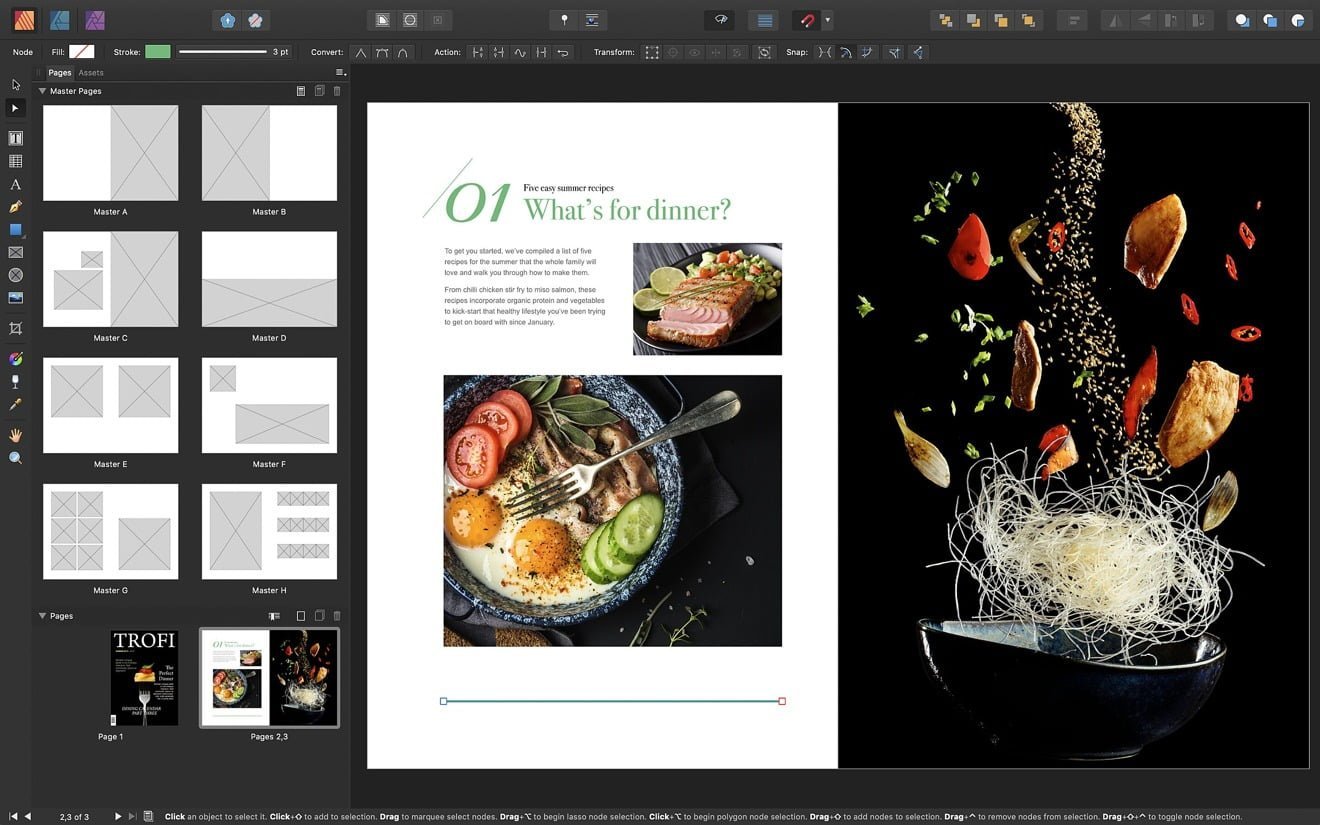
Master Pages (Parent Pages): InDesign’s Master Pages let you apply consistent elements—like page numbers and logos—across multiple pages. Updating a Master Page automatically changes these elements throughout your document, ensuring consistency and saving time. Grids and Guides: InDesign offers tools for baseline and document grids, as well as custom guides to help align text and images precisely. The “Smart Guides” feature suggests alignment and spacing as you move objects, enhancing your layout’s professionalism. Frames for Text and Graphics: InDesign uses frames to contain all content. You can create text and graphic frames in various shapes, allowing you to structure your layout and easily rearrange designs without affecting the content. |
|
‣Seamless Integration and Content Management
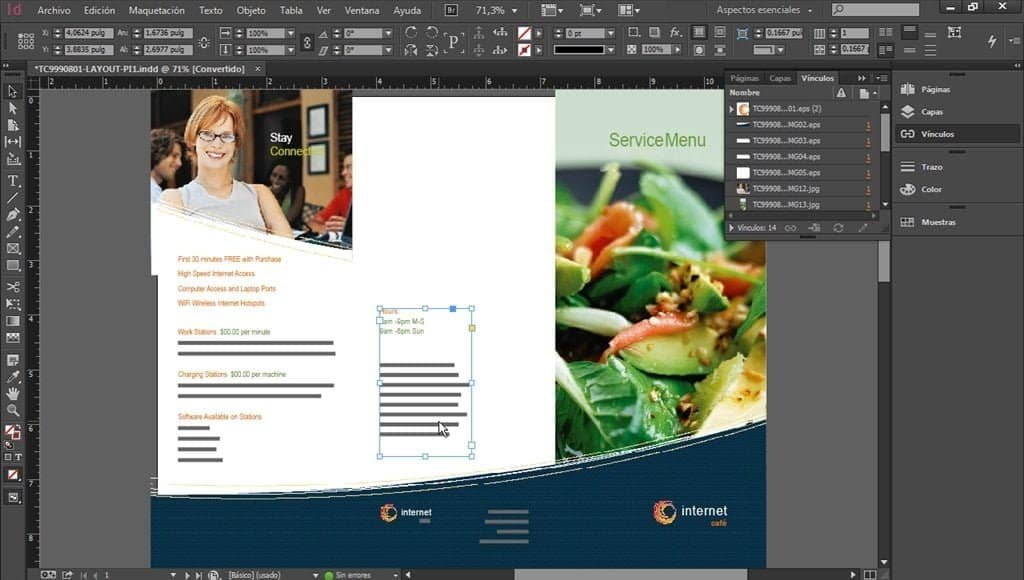
Seamless Adobe Integration: InDesign integrates smoothly with other Adobe apps, allowing direct placement of Photoshop (.PSD) and Illustrator (.AI) files in layouts. You can manage layer visibility and receive alerts in the “Links” panel for any edits, keeping graphics current. Extensive File Support: InDesign supports multiple file types like JPEG, PNG, TIFF, EPS, and PDF, along with video and audio for interactive documents. You can easily import text from Word and Excel while preserving formatting. Links Panel: This panel manages placed assets, offering real-time updates on status, resolution, and color space, helping you quickly find, edit, or replace assets. |
|
‣Productivity and Workflow Automation
Data Merge: A game-changer for creating customized documents. With Data Merge in InDesign, you can easily generate personalized certificates or mail pieces by linking a template to a data source (like a spreadsheet). It automates the creation of unique documents for each entry, saving you hours of manual work. Find/Change Enhancements: InDesign’s Find/Change function allows for more than just simple text replacement. You can search for text formatting changes and use GREP for complex tasks, like formatting phone numbers or removing extra spaces. Table and Cell Styles: Essential for working with tabular data. Create “Table Styles” for overall table formatting and “Cell Styles” for specific cells, ensuring consistency and easy updates across all tables. Preflight and Packaging: Before sending your file to a printer, use InDesign’s “Preflight” tool to check for issues like low-resolution images and missing fonts. Once ready, the “Package” function collects your InDesign file, linked graphics, and fonts into a single folder for easy sharing with colleagues or print services. |
|
‣ Extensive Libraries and Templates:
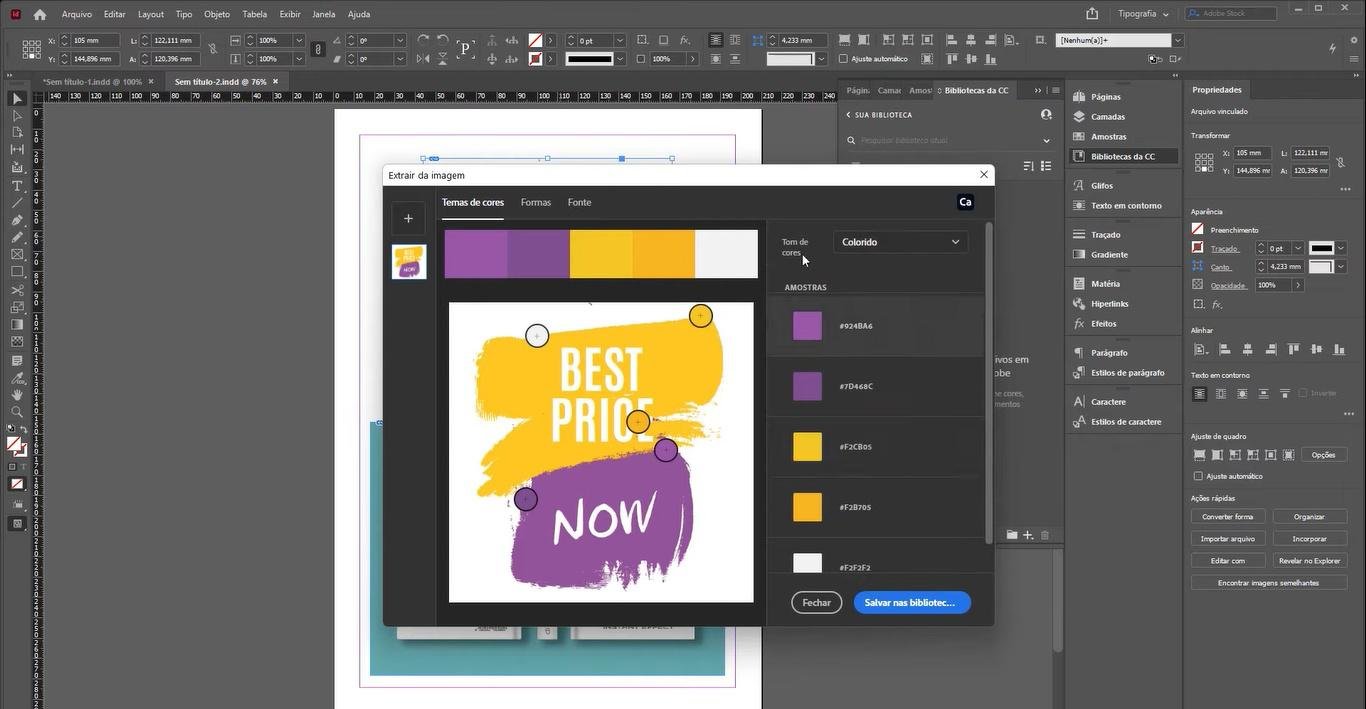
Adobe InDesign is a software that offers a wide range of design templates, fonts, images, and other creative assets through Adobe Stock. This tool is directly integrated into the software, providing a vast resource of ready-made design elements. These elements can help enhance your creativity and speed up your design process. With Adobe Stock, you have everything you need to create stunning designs. |

|
‣World-Class Typography Control
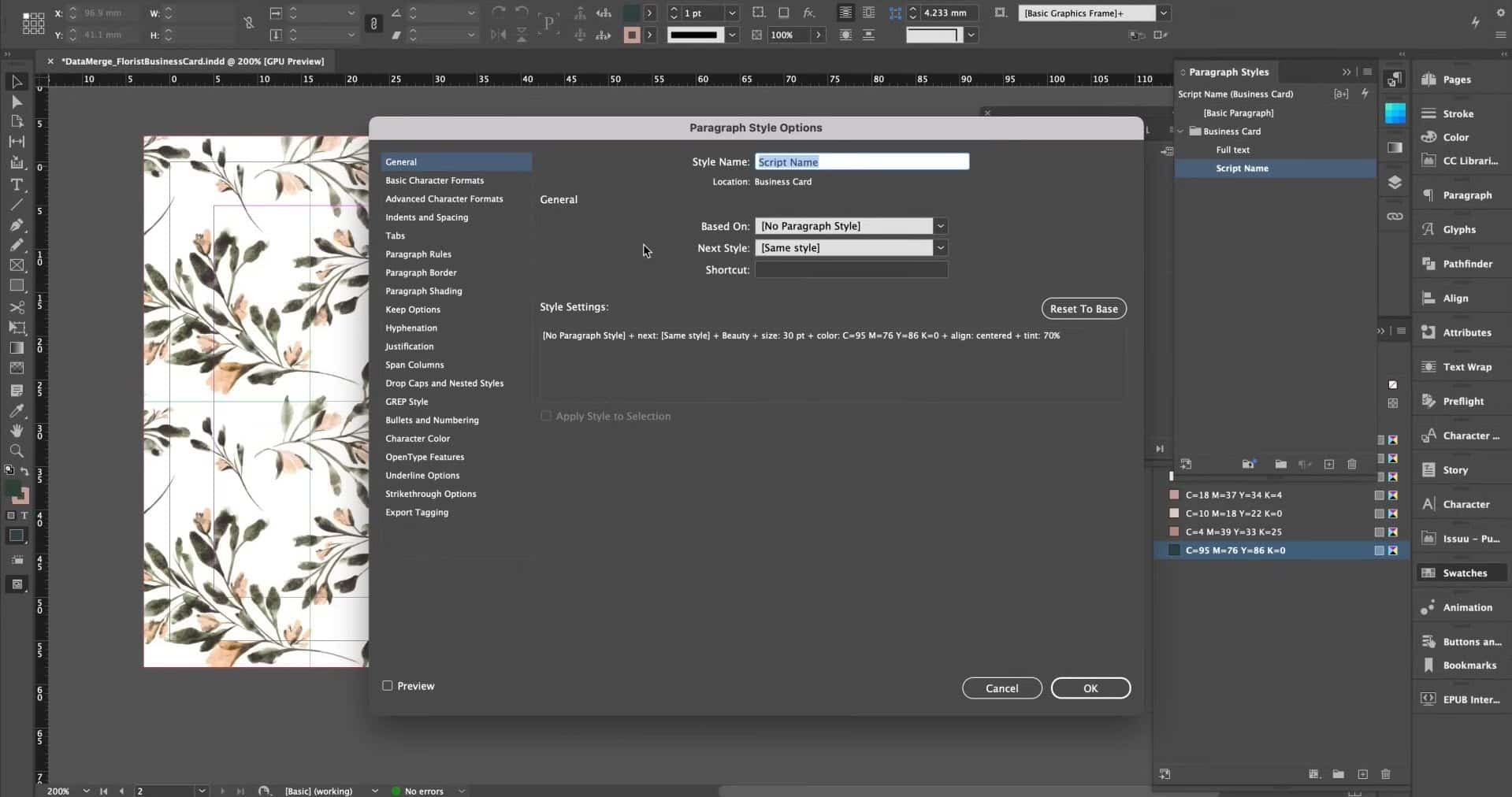
Character and Paragraph Styles: Efficient typography begins here. Define a “Paragraph Style” for font, size, color, and spacing, which updates all linked paragraphs. Use “Character Styles” to highlight individual words or phrases. OpenType Font Support: Access professional features in OpenType fonts, such as ligatures, swashes, and fractions, enhancing the polish of your typography. Text Wrap: Control how text flows around images and objects with InDesign’s powerful Text Wrap panel, allowing for precise spacing adjustments. Adobe Fonts Integration: InDesign connects seamlessly to Adobe Fonts, offering a vast library of high-quality typefaces for any project.
|

|
‣ Cross-Platform Compatibility:
Adobe InDesign is a cross-platform software that is compatible with both Windows and macOS, making it accessible to a wider range of users. It offers various file formats for exporting designs, including PDF, ePub, and HTML, making it easier for your content to be shared and distributed across different platforms and devices. |

|
‣ High-quality Output:
With InDesign, you can confidently export your designs in a variety of formats, from PDFs to print-ready files and interactive digital documents. Count on its top-notch output options for polished, professional results in both print and online publishing. |
System Requirements (Windows)
- Operating System: Windows 10 (64-bit) / Windows 11 (64-bit)
- Processor: Multicore Intel or AMD 64-bit processor with AVX2 support
- RAM: 8 GB minimum (16 GB recommended)
- Storage: 3.6 GB free disk space
- Display : 1024×768 minimum (1920×1080 recommended)
- GPU: 1 GB VRAM minimum (2 GB recommended)
- Graphics API: OpenGL 4.4+
- Internet: Required for activation and updates
Frequently Asked Questions (FAQ)
Can I use this on Windows 11?
– Yes, InDesign 2026 supports both Windows 10 and Windows 11 (64-bit).
3Can I use it for commercial projects?
– Yes—if your license source includes valid commercial rights. Verify seller compliance first.
Does it work offline?
– Most features work locally, but activation and account validation may require internet access.
Is GPU required?
– A dedicated GPU is not mandatory, but Adobe recommends at least 1GB VRAM for better performance.
What file formats does InDesign support?
– Common formats include:
INDD, IDML, PDF, EPUB, JPG, PNG, TIFF, PSD, AI.
Is InDesign 2026 stable?
– Some users reported early-version bugs after launch, so many professionals wait for minor updates before production deployment.
Q & A
Why Buy From Instant-Key?
Choosing Instant-Key.com means choosing a trusted global platform for fast, secure, and affordable digital software licenses. Every purchase is backed by genuine products and reliable customer support.100% Genuine Software Keys
All license keys are authentic, verified, and sourced from trusted suppliers. No cracks, no illegal activations — only legitimate, secure software.Instant Delivery
After successful payment, your license key and download link are delivered instantly to your email and user dashboard so you can start installing right away.Multiple Payment Methods
We support a wide range of payment options including Skrill, Mollie, MasterCard, Visa, Apple Pay, Google Pay, Stripe and other major cards and wallets for a smooth and secure checkout.Reliable Customer Support
Our team is available through WhatsApp, Email, and Live Chat to assist with installation, activation, or any questions you may have.Affordable Pricing
Get premium software like Microsoft Office, Windows OS, Adobe, Autodesk, CorelDRAW, antivirus tools, servers and more at competitive prices to help you save on essential digital tools.Easy Installation Guides
Every order includes a clear step-by-step PDF installation guide so even first-time users can install and activate their software with ease.Warranty and Replacement Guarantee
All keys come with an activation warranty. In case of any activation issue, we provide a quick replacement, ensuring a smooth and worry-free experience.Trusted by Customers Worldwide
Individuals, businesses, students, and professionals around the world rely on Instant-Key.com for genuine digital licenses that support productivity, creativity, and business growth.General Inquiries
There are no inquiries yet.






Reviews
There are no reviews yet