


Microsoft Office LTSC Standard 2024
Price range: 39.00 $ through 99.00 $
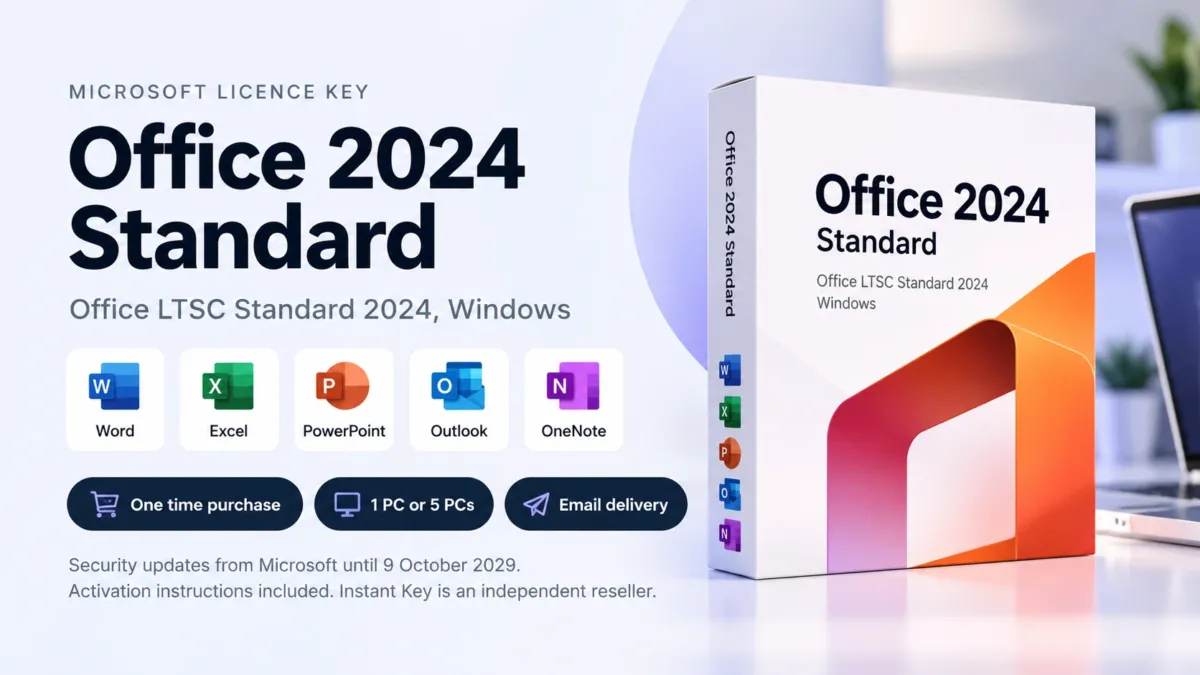
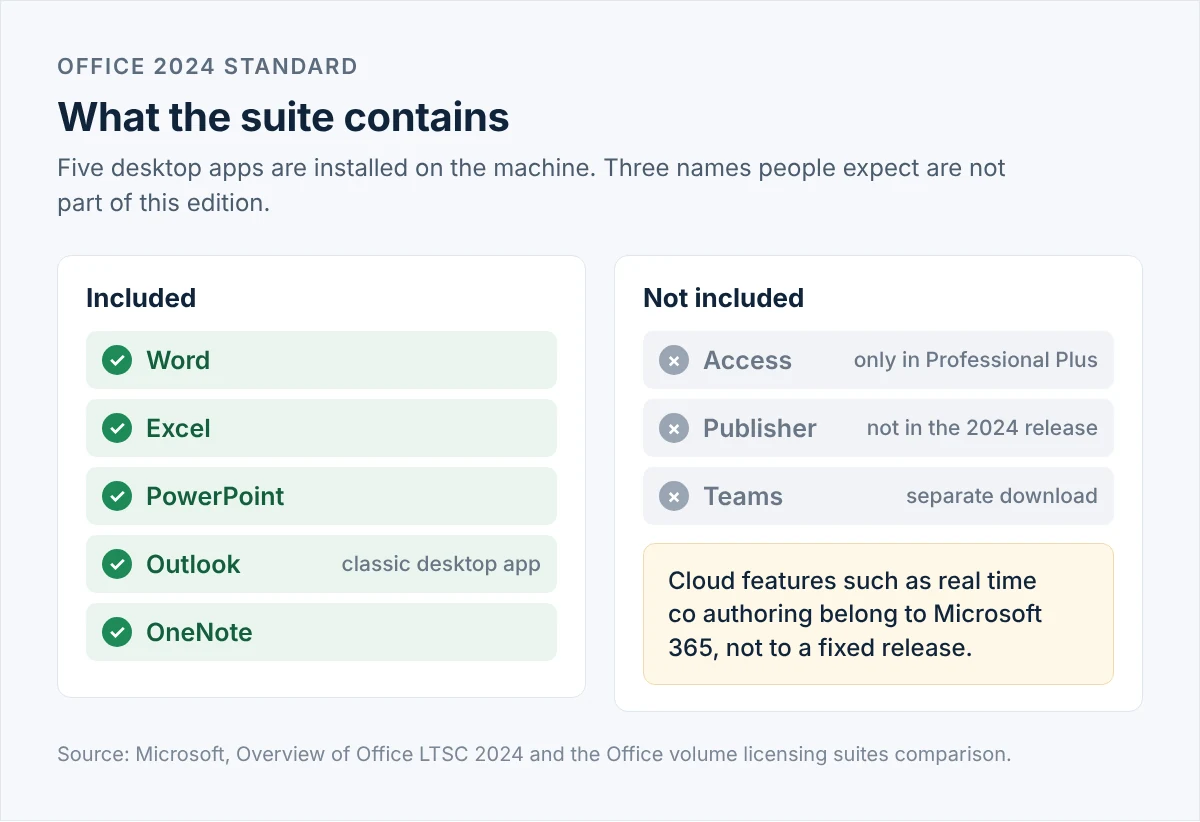
Office LTSC Standard 2024 for Windows, as a one-time purchase. Word, Excel, PowerPoint, Outlook and OneNote installed on the machine, with security updates from Microsoft until 9 October 2029. No subscription and no renewal date.
- One-time purchase, 1 PC or 5 PCs
- Word, Excel, PowerPoint, Outlook, OneNote (Access is in Professional Plus)
- Windows only, works offline
- Key and activation instructions sent by email after checkout
- Setup help included, independent reseller
- Description
- Reviews (0)
- Installation Guide
- Why buy from instant-key.com ?
Description
What’s Included with Your Purchase
- Volume Licence Key: 25 character activation code for Office LTSC Standard 2024, for 1 PC or 5 PCs depending on the option you select
- Microsoft Download: the Office Deployment Tool is published by Microsoft and downloaded from Microsoft’s own site
- Configuration File: a ready made setup file, so installing comes down to pasting your key and running one command
- Installation Guide: written step by step instructions, also in the Installation Guide tab above
- Email Delivery: key and instructions sent to your inbox within minutes of payment
- Activation Support: free technical help if the key does not activate
Microsoft Office 2024 Standard product key
Office 2024 Standard is the build Microsoft ships as Office LTSC Standard 2024. LTSC means Long Term Servicing Channel: one fixed release, installed on the computer, that receives security updates but no new features for the rest of its life. Microsoft is explicit about this. Office LTSC 2024 will not receive new features after release, and cloud features such as real time co authoring are not part of it.
For a lot of buyers that is the attraction rather than a compromise. A finance department that has built fifteen years of workbooks on a stable Excel does not want a ribbon that moves in March. A machine in a workshop with a slow connection does not want an app that checks a licence server. If that describes your situation, a fixed release is the right tool and the maths works out: you pay once instead of every month.
Microsoft supports Office LTSC 2024 with security updates until 9 October 2029, under its Fixed Lifecycle Policy. Five years of mainstream support, with no extended support phase afterwards.
One date is worth knowing before you buy anything else: Office LTSC 2021 went out of support on 13 October 2026. If you are running a 2021 volume build, you are already past that line and no longer receiving security updates. That is the usual reason people land on this page.
Key Features of Microsoft Office 2024 Standard
- Five desktop apps. Word, Excel, PowerPoint, Outlook and OneNote, installed locally and usable without an internet connection.
- One payment. No renewal date, no monthly fee, no card kept on file.
- Classic Outlook. The desktop Outlook, not the web based new Outlook.
- Security updates until 2029. Published by Microsoft under the Fixed Lifecycle Policy.
- Stable by design. The interface and the feature set stay where they are, which is what makes it suitable for shared templates and long lived workbooks.
What is new in Office 2024? Read the full breakdown of the 2024 release
Versions of Office 2024
Two volume editions exist, and a single application separates them. Everything else is the same: same Word, same Excel, same Outlook, same update timeline, same installation method.
Microsoft Office 2024 Standard
Applications: Word, Excel, PowerPoint, Outlook, OneNote.
Who it suits: offices, workshops and households where the work is documents, spreadsheets, slides and email. This is the large majority of buyers.
Microsoft Office 2024 Professional Plus
Applications: Word, Excel, PowerPoint, Outlook, OneNote and Access, Windows only.
Who it suits: teams that run an Access database. Nothing else justifies the difference in price.
| Standard 2024 | Professional Plus 2024 | |
|---|---|---|
| Word, Excel, PowerPoint, Outlook, OneNote | Yes | Yes |
| Access | No | Yes, Windows only |
| Security updates until | 9 October 2029 | 9 October 2029 |
| Installed with | Office Deployment Tool | Office Deployment Tool |
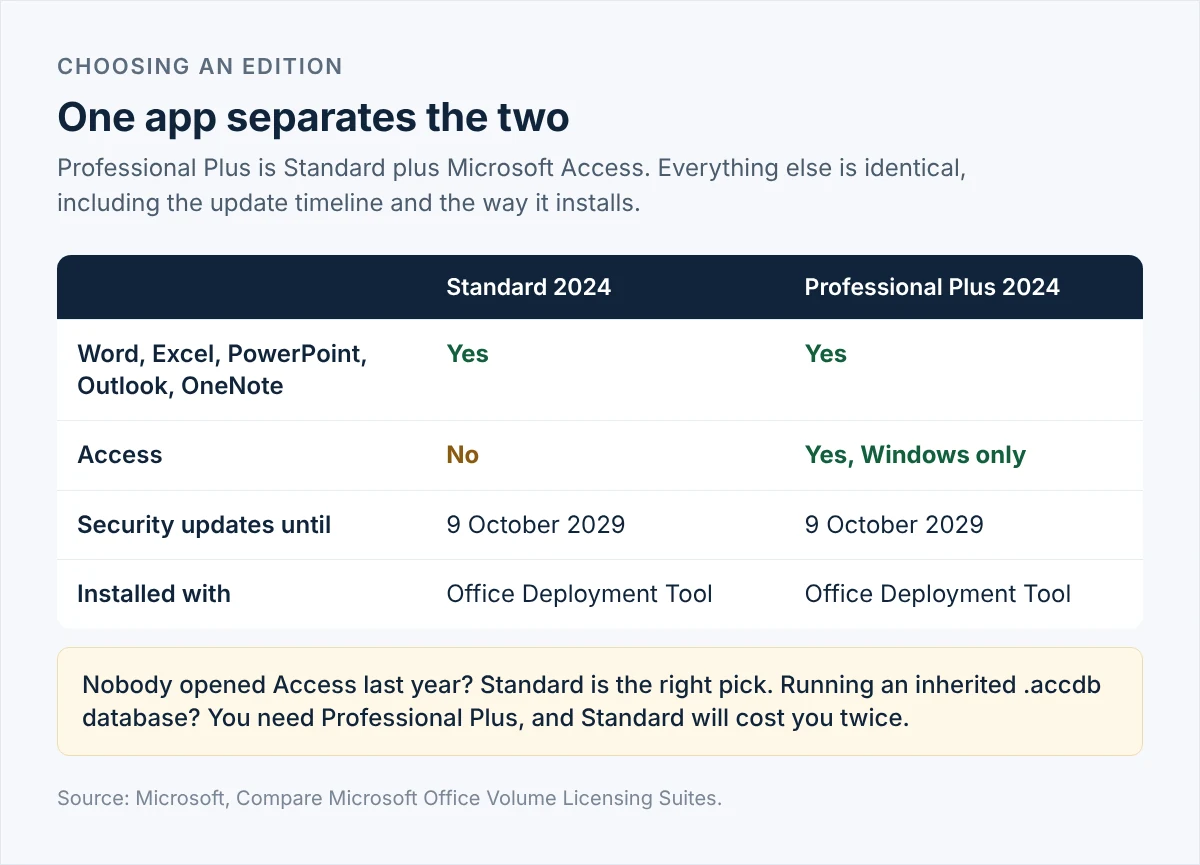
So the decision is short. If nobody on your team has opened Access in the last year, Standard is the correct choice and the difference in price is money you keep. If you have inherited an .accdb database that runs part of the business, you need Office 2024 Professional Plus instead, and buying Standard first will cost you twice.
Three names people expect are not in this release at all. Access belongs to Professional Plus. Publisher is not part of the 2024 release, since Microsoft is retiring it after October 2026. Teams is not preinstalled and comes as a separate download.
Why Use a Microsoft Office 2024 Standard Product Key?
- The apps stay on your machine. No sign in loop, no licence check over the network, no interruption when the connection drops.
- The cost stops. One payment covers the machine for the supported life of the release, where a subscription keeps billing for as long as you use it.
- Updates keep coming. Security updates are published by Microsoft until 9 October 2029, so a fixed release is not a frozen one.
- Nothing changes under you. Shared templates, macros and workbooks behave in three years as they behave today.
One-time purchase or a Microsoft 365 subscription?
| Office 2024 Standard | Microsoft 365 | |
|---|---|---|
| How you pay | Once | Every month or every year, per user |
| New features | None after release. The apps stay as they are. | Added continuously |
| Real time co authoring and cloud features | Not included | Included |
| Works offline | Yes | Yes, with periodic sign in |
| Ends | 9 October 2029 | When you stop paying |
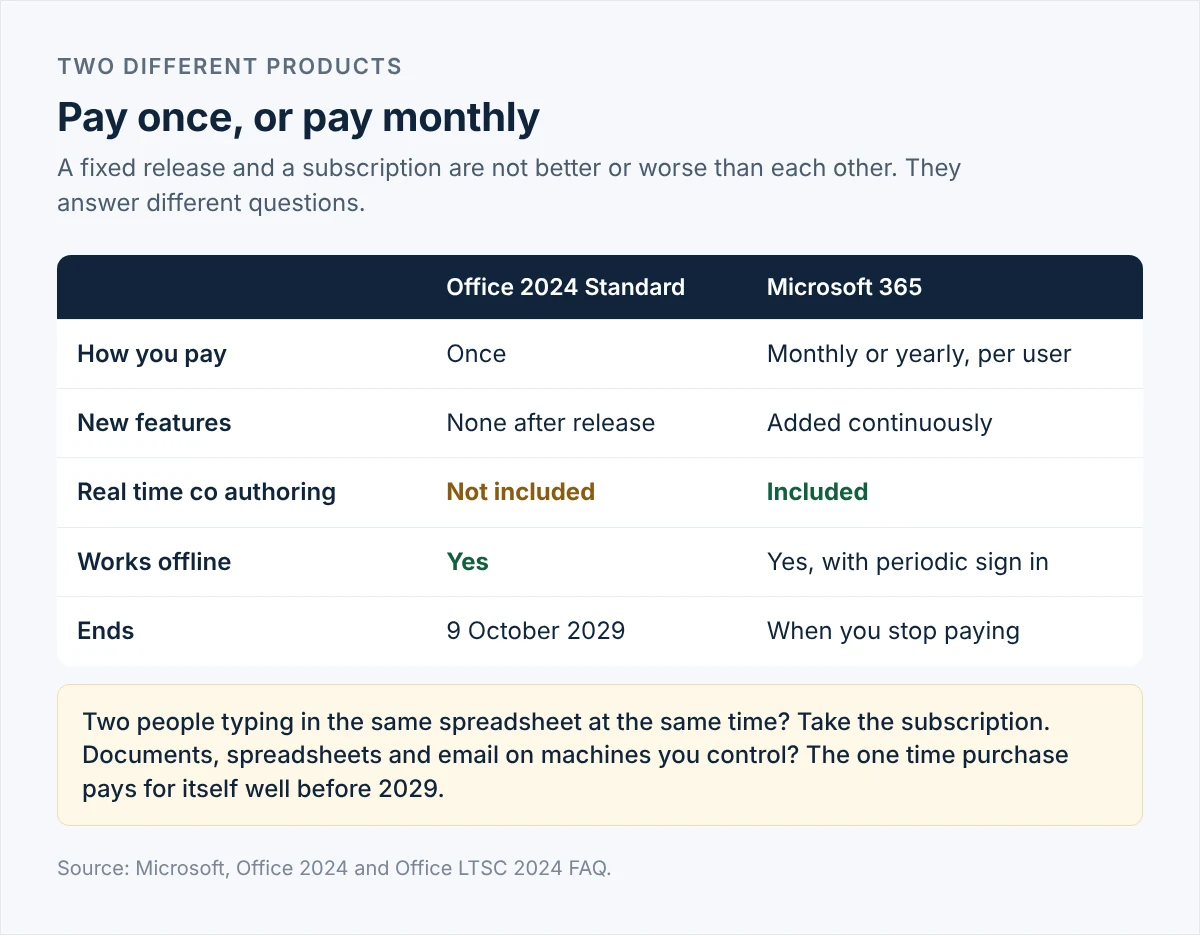
We would rather you buy the right thing once. If two people need to type in the same spreadsheet at the same time, or you want the newest features as they ship, a subscription is simply the better product and a fixed release will frustrate you. Our Office 365 option covers that case. If your work is documents, spreadsheets and email on machines you control, the one-time purchase pays for itself well before 2029.
1 PC or 5 PCs
The licence is counted per computer, not per person. Choose 1 PC to equip a single machine. The 5 PC option suits a small office, a workshop with several stations, or a household where everyone needs the same apps. It works out cheaper per machine than five separate keys, and you manage one key instead of five.
System Requirements
| Item | Requirement |
|---|---|
| Operating system | Windows 11, Windows 11 LTSC 2024, Windows 10 LTSC 2021, Windows 10 LTSC 2019, Windows Server 2025 or Windows Server 2022. ARM based devices need Windows 11 as a minimum. |
| Processor | 1.1 GHz or faster, 2 cores |
| Memory | 4 GB RAM |
| Disk space | 4 GB available |
| Display | 1280 x 768. The 64-bit build is required for 4K and above. |
| Graphics | Hardware acceleration needs a Direct3D 9.1 or higher adapter and a WDDM 1.3 or higher driver. |
| Other | Some features need .NET 3.5 or 4.6 and later installed separately. |
Read the operating system line carefully, because it catches people out. Microsoft lists only the LTSC editions of Windows 10 as supported for Office LTSC 2024, since consumer Windows 10 reached its own end of support in October 2025. The installer will usually run on an ordinary Windows 10 machine, but that combination sits outside what Microsoft supports, and we would rather tell you now than after checkout.
Windows only. There is a separate Microsoft build called Office LTSC Standard for Mac 2024, and this listing is not it.
Why Upgrade?
If you are on Office 2021, the answer is a date rather than a feature. Office LTSC 2021 stopped receiving security updates on 13 October 2026. Office 2016 and Office 2019 stopped a year earlier. An unpatched Office suite that opens attachments all day is the kind of risk that stays invisible until it is not, and moving to the 2024 release buys back three more years of updates for a single payment.
If you are on Microsoft 365 and the cloud features go unused, the upgrade is financial. Count the seats, multiply by twelve, and compare.
FAQ’s
Is Office 2024 Standard a subscription?
No. It is a one-time purchase. You pay once, install the apps, and there is nothing to renew. Microsoft provides security updates for Office LTSC 2024 until 9 October 2029.
Which applications come with it?
Word, Excel, PowerPoint, Outlook and OneNote. Access is not part of Standard, and Publisher is not part of the 2024 release at all.
What is the difference between Standard and Professional Plus?
Access. Professional Plus contains the same five apps as Standard plus Microsoft Access, which runs on Windows only. Everything else about the two editions is the same.
How long will it keep receiving updates?
Microsoft lists Office LTSC 2024 as supported until 9 October 2029, which is five years of mainstream support with no extended support phase afterwards. The apps keep working after that date, but no further security updates are published.
Does it work on a Mac?
No. This listing is the Windows build. Microsoft produces a separate Office LTSC Standard for Mac 2024, which is a different licence.
How many computers does one licence cover?
One licence covers one computer. Choose the 5 PC option if you need to install it on five machines. Licences are counted per device rather than per person.
Can I move the licence to another computer later?
A volume key has a set number of activations. If you replace a machine, write to us with your order number and we will check what your key has left and reset it where the terms allow.
How to Activate Microsoft Office 2024 Standard
- Your key and instructions arrive by email, usually within minutes of payment.
- Download the Office Deployment Tool from Microsoft and extract it to a folder.
- Open the configuration file we send you and paste your key into the PIDKEY field.
- Run setup with the configure switch and let it download and install the suite.
- Open Word once. Activation completes on its own if the machine has a connection.
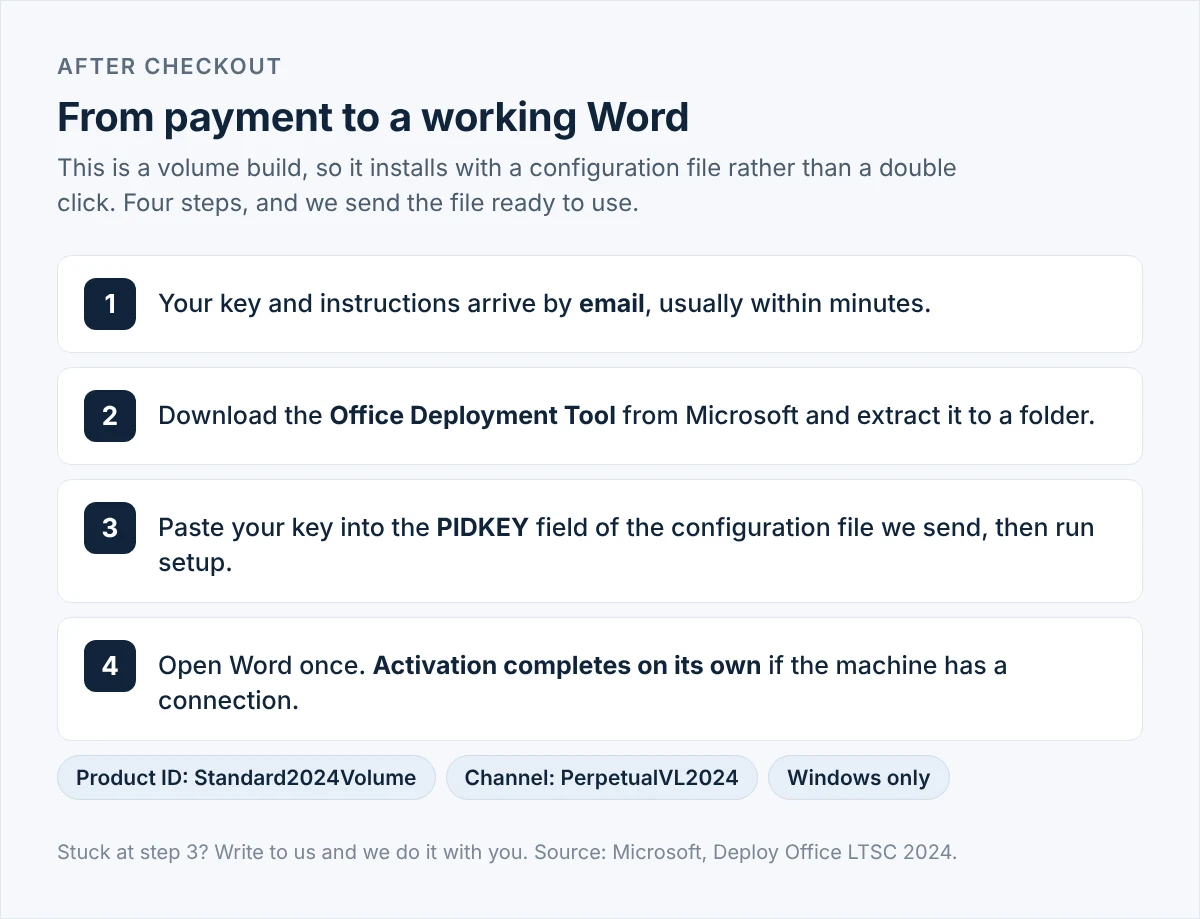
Worth being straight about: this is a volume build, so it installs from a configuration file rather than a single click. The product ID is Standard2024Volume and the channel is PerpetualVL2024. If that reads like more work than you want, say so when you order and our team will do it with you on the day. One thing it is not: a key you redeem on a Microsoft account page to appear in your account library. Volume builds do not work that way, and if a key tied to a Microsoft account is what you need, Office 2024 Home or Home and Business is the edition to look at.
Frequently asked questions: Microsoft Office 2024 Standard
How fast is delivery?
Keys are sent by email to your checkout address, normally within minutes of the payment clearing. Nothing is shipped.
Is the key valid for a limited time?
No. The licence does not expire. Microsoft publishes security updates for the release until 9 October 2029, and the apps continue to run after that date.
Is payment secure?
Card payments are processed through an encrypted checkout. We accept Visa, MasterCard and American Express.
Can I get an invoice?
Yes. Ask with your order number and we will send one for your records.
What if the key does not activate?
Contact us with your order number and a screenshot of the error. We will work through it with you and replace the key if the problem turns out to be the key itself.
Any technical question or hesitation? Our team answers through live chat, WhatsApp and email before you order as readily as after. Instant Key is an independent reseller of software licences, not a Microsoft division or a Microsoft partner, and we would rather talk you out of the wrong product than sell it to you.
How to Install Microsoft Office 2024 Standard
- Open your order email. It contains your licence key, the link to the Office Deployment Tool on Microsoft’s site, and the configuration file prepared for this edition.
- Download the Office Deployment Tool from Microsoft and run it. It extracts a setup file and a sample configuration file into the folder you choose.
- Open the configuration file we sent in Notepad. Find the PIDKEY attribute and paste your 25 character key between the quotation marks. Save the file in the same folder as setup.exe.
- Open Command Prompt as an administrator in that folder and run: setup.exe /configure configuration.xml
- Wait for the installation to finish. The files download from Microsoft, so the time depends on your connection. The window closes on its own when it is done.
- Open Word once. Activation completes by itself if the machine has an internet connection. You can confirm it under File, then Account.
Installing on several machines with the 5 PC option? Copy the same folder, including your edited configuration file, to each computer and run step 4 again. There is nothing to change between machines.
Need Help?
If you run into any installation or activation issue, simply reply to your order email. Our support team can also assist you remotely through AnyDesk for a quick resolution, and we will replace the key if the problem turns out to be the key itself.





Reviews
There are no reviews yet